
What Is WhatsApp Automation?
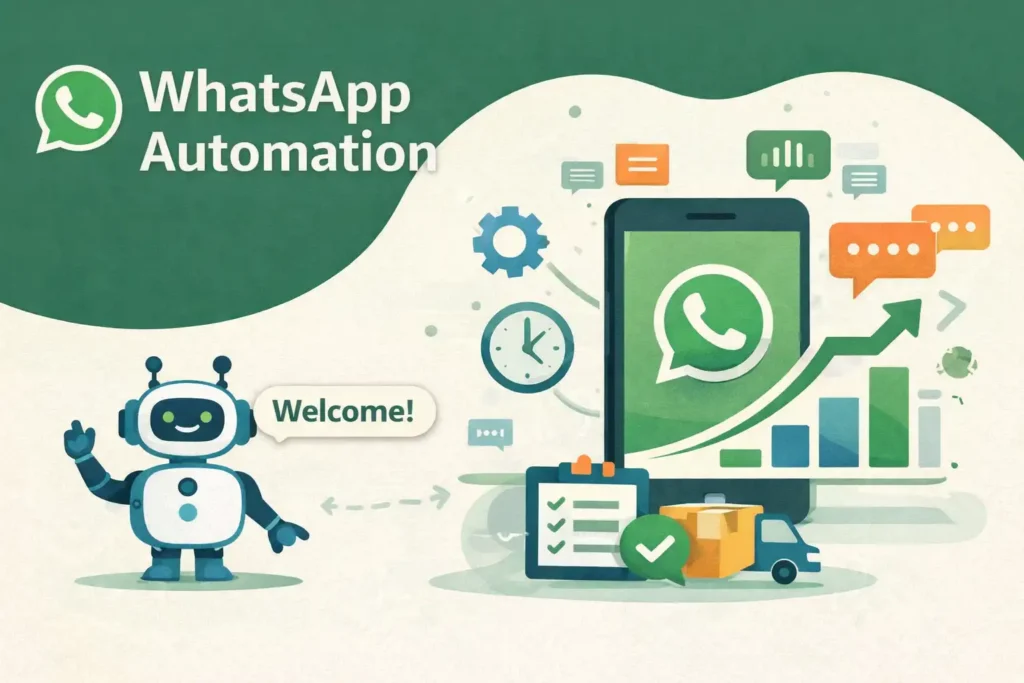
WhatsApp automation is the process of using software, workflows, and intelligent systems to automatically handle customer conversations and business communication on WhatsApp. Instead of manually replying to every message, businesses can automate repetitive tasks such as welcome messages, customer support responses, lead collection, order updates, and appointment reminders. It helps companies communicate faster while maintaining consistency. With the growing use of messaging apps worldwide, businesses increasingly rely on automation to improve efficiency and create personalized experiences without increasing operational workload or requiring larger customer service teams.
Why Businesses Need WhatsApp Automation?
Modern customers expect quick responses and convenient communication channels. Waiting several hours for a reply can often result in lost opportunities and reduced customer satisfaction. WhatsApp automation helps businesses deliver immediate interactions while managing large volumes of messages simultaneously. According to HubSpot research, many customers expect brands to respond within minutes rather than hours. Automation also reduces repetitive manual work, improves team productivity, and helps businesses engage customers throughout the buying journey. This creates stronger relationships, better retention rates, and more opportunities for increasing conversions and long-term business growth.
How WhatsApp Automation Works
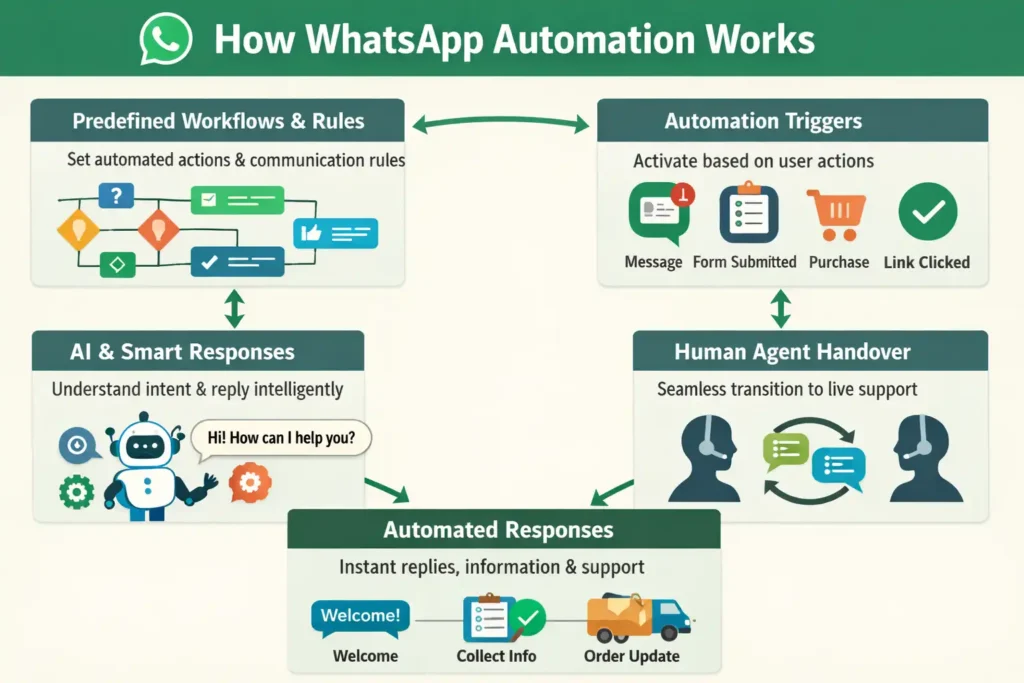
WhatsApp automation operates through predefined workflows and smart communication rules that determine how messages are sent, received, and managed. Businesses connect automation platforms with customer interactions so actions can happen automatically based on user behavior. For example, when a customer sends a message, the system can trigger a welcome response, collect information, suggest solutions, or route the conversation to support teams. Advanced automation systems may also use artificial intelligence to understand intent and improve conversations. This process creates faster interactions while keeping communication organized and scalable.
Triggers and Automated Workflows
Triggers are events that activate a specific automated action. These events can include receiving a message, submitting a form, clicking a product link, or completing a purchase. Once activated, workflows guide users through a sequence of actions automatically. For example, a customer requesting product information may instantly receive details, pricing, and a follow-up message without requiring manual intervention from the business team.
Rule-Based vs AI-Powered Automation
Rule-based automation follows predefined instructions and responds according to specific keywords or actions. It works effectively for predictable interactions and structured conversations. AI-powered automation is more advanced because it can understand customer intent, context, and natural language patterns. AI systems adapt to different conversation styles, allowing businesses to deliver more personalized responses and create smoother customer experiences.
Message Templates and Response Flows
Message templates provide businesses with standardized communication formats for recurring interactions. These templates can include greetings, support responses, appointment confirmations, and order notifications. Response flows organize how conversations progress from one step to another. Instead of sending isolated messages, businesses create logical communication paths that guide customers through information, support requests, or purchasing decisions in a structured way.
Human Agent Handover Process
Automation cannot solve every customer concern, especially when conversations become complex or require personalized attention. Human agent handover ensures the customer is transferred smoothly from automated interactions to a support representative. This process prevents frustration and maintains service quality. Businesses often use handover systems when customers request detailed assistance, unique solutions, or situations requiring human judgment and decision-making expertise.
Key Features of WhatsApp Automation
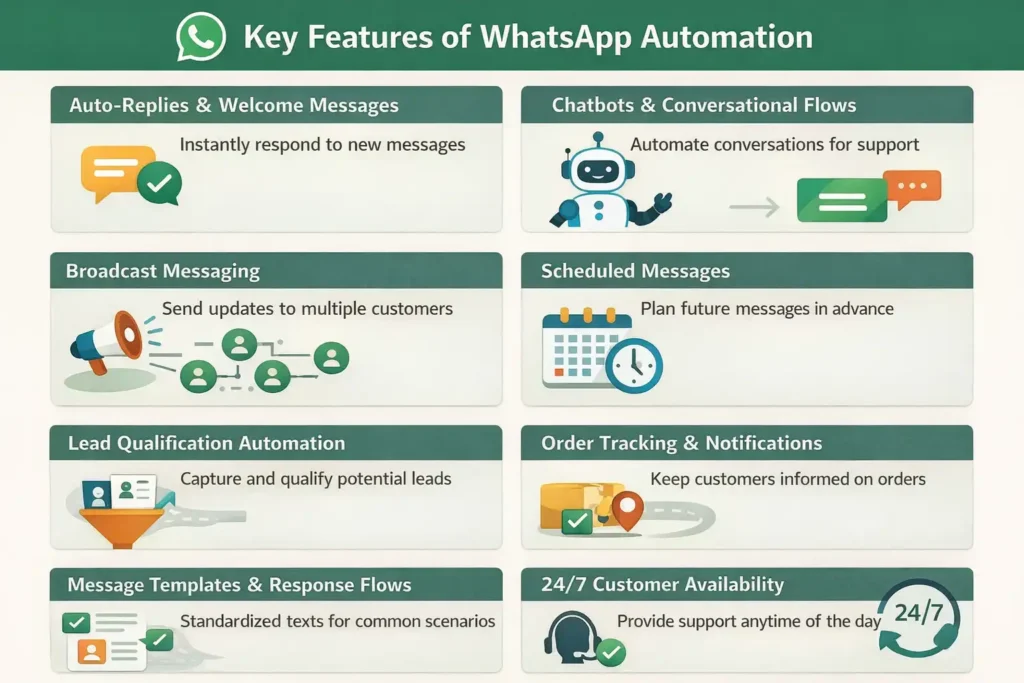
WhatsApp automation provides businesses with a collection of powerful features designed to simplify communication and improve customer engagement. Instead of handling repetitive tasks manually, companies can automate interactions while maintaining consistency and speed. These features help organizations manage customer support, marketing campaigns, lead generation, and post-purchase communication more effectively. As customer expectations continue to rise, businesses use automation capabilities to create faster, smarter, and more personalized experiences. Whether for small startups or large enterprises, these features help scale communication while reducing operational effort and improving customer satisfaction.
Auto-Replies and Welcome Messages
Auto-replies and welcome messages allow businesses to instantly acknowledge customer inquiries. When someone sends a message, automated greetings can provide immediate assistance, share business hours, or direct customers toward relevant information. Quick responses improve user experience because customers feel recognized immediately, even when support teams are unavailable outside normal working hours.
Chatbots and Conversational Flows
Chatbots help businesses manage conversations automatically through predefined paths and intelligent responses. They can answer common questions, collect customer details, suggest products, and guide users through specific actions. Conversational flows create a structured interaction process that keeps communication organized and helps customers receive accurate information without unnecessary delays.
Broadcast Messaging
Broadcast messaging allows businesses to send updates or promotional content to multiple users simultaneously. Companies use this feature for announcements, product launches, discounts, or event notifications. Unlike group messages, customers receive broadcasts privately, creating a more personalized experience while helping businesses reach large audiences efficiently and maintain stronger engagement.
Scheduled Messages
Scheduled messages enable businesses to send communications automatically at specific times. Companies can plan reminders, promotional campaigns, appointment confirmations, or follow-up messages in advance. This feature ensures consistency in communication and eliminates the risk of missing important interactions while improving customer engagement through timely and relevant messaging.
Lead Qualification Automation
Lead qualification automation helps businesses identify potential customers by collecting and analyzing information during conversations. Automated systems ask questions regarding customer interests, budgets, preferences, and requirements. This process filters high-quality prospects and directs sales teams toward more valuable opportunities, helping improve efficiency and increasing the chances of successful conversions.
Order Tracking and Notifications
Order tracking automation keeps customers informed throughout the purchasing journey. Businesses can automatically send updates about order confirmations, shipment status, delivery progress, and completed transactions. According to customer experience studies, proactive updates increase customer confidence and reduce support inquiries because customers receive important information without needing to ask repeatedly.
Benefits of Using WhatsApp Automation for Businesses
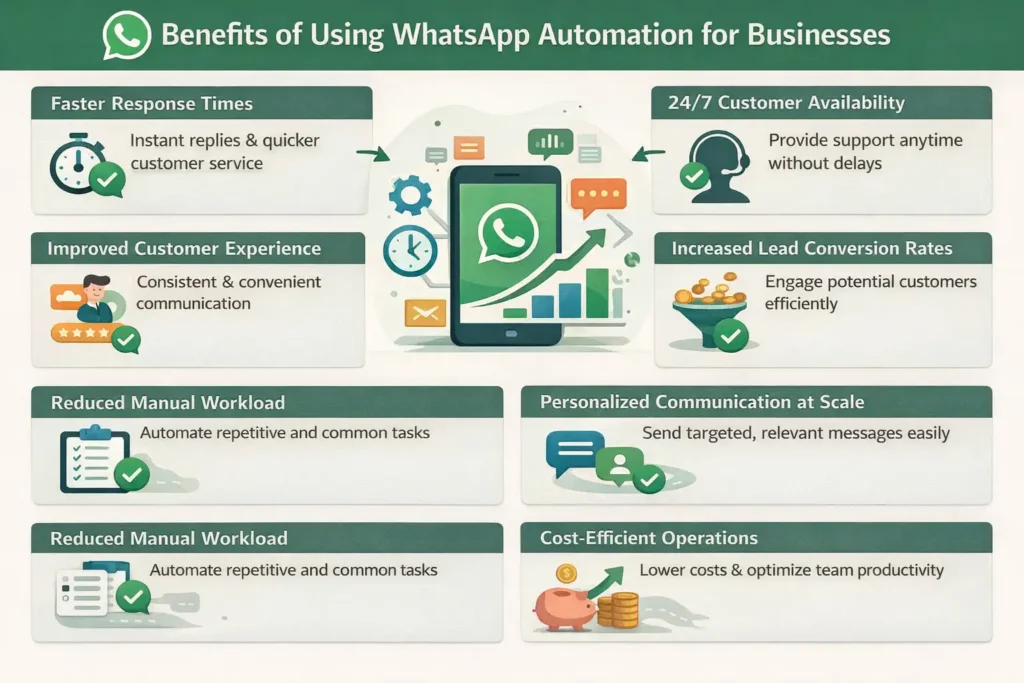
Businesses today operate in highly competitive environments where speed, convenience, and customer experience directly influence success. WhatsApp automation helps companies streamline communication while improving operational efficiency. Instead of manually handling repetitive tasks, teams can focus on higher-value activities that require strategic thinking and personal interaction. Automation also supports business growth by maintaining consistent communication with customers at scale. Research from customer engagement studies consistently shows that quick responses and personalized interactions contribute significantly to customer loyalty, conversion rates, and long-term business performance.
Faster Response Times
Customers prefer immediate responses when contacting businesses. Automation allows instant replies to inquiries, reducing waiting times and improving customer satisfaction. Quick responses can prevent potential customers from leaving and searching for alternatives. Faster communication also helps businesses handle a larger volume of conversations without overwhelming support teams.
24/7 Customer Availability
Unlike human teams with limited working hours, automation operates continuously without interruption. Customers can receive assistance, answers, and updates at any time of day.
Improved Customer Experience
Customer experience improves when communication becomes faster, simpler, and more convenient. Automated systems reduce delays and provide users with immediate access to useful information. Consistent interactions create smoother customer journeys and help businesses build trust, which plays an important role in customer retention and long-term loyalty.
Increased Lead Conversion Rates
Responding quickly to customer inquiries can directly influence purchasing decisions. Automation helps maintain timely follow-ups, answer customer questions instantly, and guide potential buyers toward the next stage of the sales process more effectively.
Reduced Manual Workload
Many customer interactions involve repetitive tasks such as answering common questions, confirming appointments, or providing updates. Teams can then focus on complex customer issues and strategic business activities instead of spending valuable time on repetitive processes.
Personalized Communication at Scale
Automation systems can use customer information and behavioral data to create more personalized interactions. Businesses can address customers by name, recommend relevant products, and send targeted messages based on preferences. Personalized communication creates stronger relationships while allowing businesses to maintain meaningful engagement even with large audiences.
💚 You might also like: 5 Best Tips to Protect Yourself From Online Scams
Use of WhatsApp Automation in Different Fields
WhatsApp automation is no longer limited to customer support alone. Businesses across multiple industries use automation to improve communication and deliver faster services. Different sectors have unique requirements, but automation provides flexible solutions that support customer engagement, scheduling, lead management, and information sharing. As messaging continues to become a preferred communication channel, industries are integrating automation into daily operations to increase efficiency and create more convenient experiences for customers and users.
E-commerce and Online Stores
Online businesses use WhatsApp automation to manage product inquiries, shopping assistance, abandoned cart reminders, and order updates. Automated communication helps customers receive information quickly and improves the buying experience. Businesses can also provide personalized recommendations that encourage repeat purchases and strengthen customer relationships.
Healthcare Appointment Scheduling
Healthcare organizations use automation to simplify appointment booking and patient communication. Patients can receive appointment confirmations, reminders, and schedule updates automatically. This reduces missed appointments and lowers administrative workload while improving the overall experience for both healthcare providers and patients.
Real Estate Lead Management
Real estate businesses often receive inquiries from multiple potential buyers simultaneously. Automation helps collect information about budgets, property preferences, and locations. Qualified leads can then be routed to agents for follow-up, improving efficiency and helping teams prioritize high-potential prospects.
Education and Student Support
Educational institutions use WhatsApp automation for admission inquiries, class reminders, announcements, and student assistance. Automated systems provide instant information and reduce delays in communication. Students can quickly receive answers regarding schedules, programs, and academic updates without relying entirely on manual support.
Customer Service and Support Teams
Support teams use automation to answer frequently asked questions, manage tickets, and direct users toward appropriate solutions. Automated systems handle simple issues immediately while transferring complex cases to human representatives. This approach improves efficiency and ensures customers receive faster and more organized support experiences.
Step-by-Step Guide to Set Up WhatsApp Automation
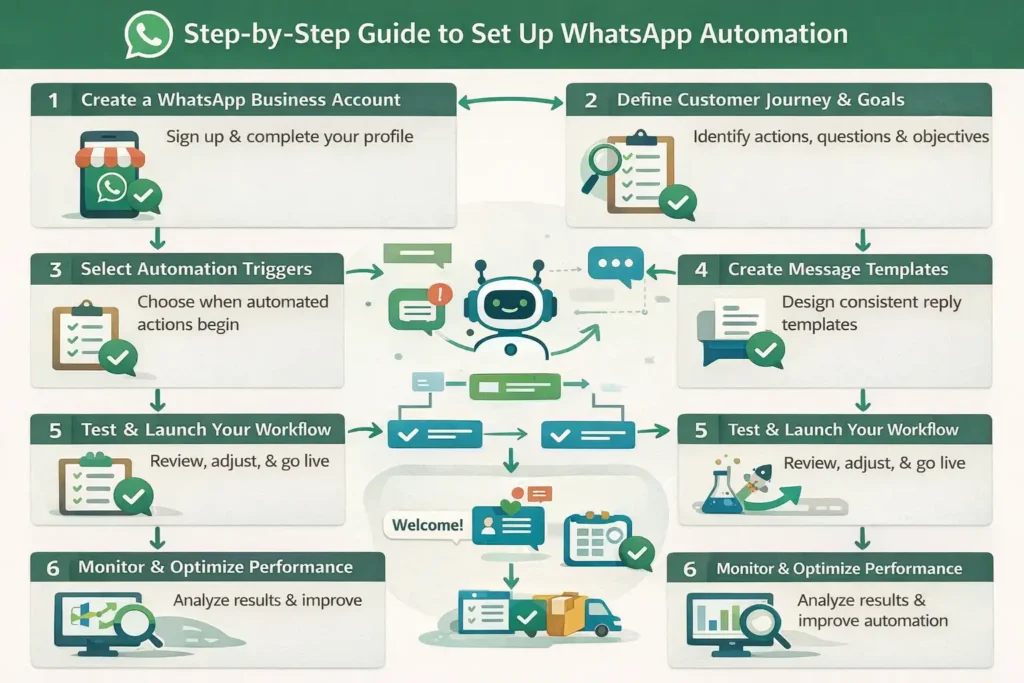
Setting up WhatsApp automation requires more than simply installing software and sending automated messages. A successful automation strategy starts with understanding customer needs and designing workflows that support business goals. Proper setup ensures customers receive relevant responses at the right time without creating confusion or frustration. Businesses should focus on building logical communication paths that improve engagement and customer satisfaction. Following a structured implementation process also helps avoid common mistakes and ensures automation delivers measurable results for sales, support, and customer relationship management.
Create a WhatsApp Business Account
The first step is creating a WhatsApp Business account because it provides access to essential business features and automation capabilities. Businesses should complete profile details, including contact information, descriptions, operating hours, and business categories. A professional profile builds trust and gives customers important information before conversations even begin.
Define Customer Journey and Goals
Before creating automation workflows, businesses should understand how customers interact throughout the buying process. Identify common customer actions, questions, and expectations at each stage. Setting clear goals such as increasing lead generation, improving customer support, or reducing response times helps create focused automation strategies that deliver meaningful business outcomes.
Select Automation Triggers
Automation triggers determine when specific actions should begin. Triggers can include customer messages, completed purchases, website form submissions, or abandoned carts. Selecting the right triggers ensures customers receive timely responses that match their behavior and needs. Effective triggers create smoother interactions and prevent irrelevant communication.
Create Message Templates
Message templates provide consistent communication for recurring interactions. Businesses can create templates for welcome messages, order updates, appointment confirmations, and customer support replies. Well-structured templates should use simple language and include personalized elements to make automated conversations feel more natural and engaging for customers.
Test and Launch Your Workflow
Before making automation live, testing is necessary to identify errors and improve performance. Businesses should review message timing, response accuracy, workflow logic, and user experience. Testing helps ensure every interaction functions correctly and prevents customers from experiencing broken communication paths or confusing responses after launch.
💚 You might also like: 5 Best E-commerce Platforms for Online Stores 2026
Best WhatsApp Automation Tools and Platforms
Choosing the right WhatsApp automation platform can significantly affect communication efficiency and customer experience. Different tools provide different capabilities, including chatbot creation, team collaboration, marketing automation, and API integrations. Businesses should evaluate factors such as ease of use, scalability, pricing, and available features before selecting a solution. Many platforms today also include artificial intelligence and no-code functionality, making automation more accessible even for businesses without technical expertise. Popular solutions continue to evolve as customer messaging requirements become increasingly advanced.
WATI
WATI is designed specifically for businesses that want an all-in-one WhatsApp communication platform. It offers shared inbox functionality, chatbot builders, broadcast messaging, and CRM integrations. Its user-friendly interface makes it suitable for small and medium-sized businesses looking to automate customer support and sales activities without requiring advanced technical skills.
Twilio
Twilio is a developer-focused communication platform that provides highly customizable WhatsApp automation capabilities. Businesses can build personalized workflows, notifications, and customer journeys using APIs. It offers strong flexibility and scalability, making it useful for organizations requiring custom solutions and advanced integrations.
ManyChat
ManyChat helps businesses automate customer interactions through a visual no-code interface. It supports chatbot creation, marketing campaigns, and conversational flows across multiple channels, including WhatsApp. The platform is particularly useful for businesses focusing on customer engagement and lead generation activities.
Respond.io
Respond.io provides a centralized communication platform where businesses can manage WhatsApp alongside other messaging channels. It offers workflow automation, team collaboration features, conversation routing, and performance analytics. This makes it suitable for businesses handling customer interactions across multiple communication platforms.
💚 You might also like: 10 Best YouTube Channels to Learn Web Development
Tips
WhatsApp automation can improve communication and increase efficiency, but success depends on how businesses implement it. Poorly designed automation can make interactions feel robotic and frustrate customers instead of helping them. The goal should always be to create meaningful experiences while simplifying repetitive tasks. Businesses that combine smart automation with human interaction often achieve stronger engagement and better customer satisfaction. Following proven practices helps maintain conversation quality, improve performance, and ensure customers continue receiving value from every interaction with your brand.
Keep Conversations Human and Personalized
Customers prefer conversations that feel natural rather than robotic. Businesses should use customer names, personalized recommendations, and conversational language in automated messages. Small personalized elements can create stronger connections and improve customer engagement. Even when communication is automated, interactions should still feel friendly, relevant, and tailored to individual customer needs.
Avoid Over-Automation
Automating every interaction can create frustrating customer experiences. Some situations require empathy, critical thinking, and personalized assistance that automation cannot provide effectively. Businesses should automate repetitive tasks while leaving complex concerns for human representatives. Finding the right balance helps maintain communication quality and prevents customers from feeling disconnected.
Create Clear Call-to-Actions
Every automated message should guide customers toward a specific action. Clear call-to-actions help users understand what they should do next, whether it involves visiting a website, confirming an appointment, viewing products, or contacting support. Simple and direct instructions improve engagement and increase the effectiveness of communication workflows.
Balance Bots and Human Support
Automation works best when combined with human assistance. Chatbots can manage common requests quickly, while human agents can handle complex or sensitive conversations. Businesses should create smooth transition processes between automated systems and support representatives to ensure customers receive appropriate help without delays or confusion.
Monitor and Optimize Performance
Automation should continuously improve over time. Businesses need to monitor metrics such as response rates, engagement levels, customer feedback, and conversion performance. Regular analysis helps identify weak points in workflows and opportunities for optimization.
FAQs
Is WhatsApp automation free?
WhatsApp automation can be free at a basic level through the WhatsApp Business application, which includes simple features such as greeting messages and quick replies. However, advanced automation features like chatbots, API integrations, and large-scale messaging usually require paid platforms or subscription services.
Can small businesses use WhatsApp automation?
Yes, small businesses can benefit significantly from WhatsApp automation. Automation helps smaller teams manage customer interactions efficiently without hiring additional staff. Features like automated replies, customer support workflows, and lead management can save time while improving customer communication.
Is WhatsApp automation safe and legal?
WhatsApp automation is generally safe and legal when businesses follow platform guidelines and data privacy regulations. Companies should obtain customer consent before sending promotional messages and use approved automation tools to avoid violating WhatsApp policies.
Can I automate WhatsApp without coding?
Yes, many modern WhatsApp automation platforms provide no-code or low-code solutions. Businesses can create workflows, chatbots, and automated communication systems through visual interfaces without requiring technical programming skills.
Does WhatsApp automation increase sales?
WhatsApp automation can contribute to higher sales by improving response speed, engaging customers quickly, and maintaining consistent follow-up communication. Faster responses and personalized interactions often help move potential customers through the purchasing process more effectively.
How do chatbots work with WhatsApp automation?
Chatbots function as automated virtual assistants that interact with users based on predefined rules or artificial intelligence. They answer common questions, collect customer information, guide users through workflows, and transfer conversations to human agents when necessary.
💚 You might also like: Oncepik: Smart & Simple Tool for Team Productivity
Conclusion
WhatsApp automation has transformed the way businesses communicate with customers by making interactions faster, smarter, and more efficient. From automated replies and chatbots to lead management and customer support, automation helps organizations handle large volumes of communication without sacrificing quality. Businesses across industries are increasingly adopting these solutions to improve customer experiences and reduce operational workloads. When implemented strategically, WhatsApp automation does more than save time it creates stronger customer relationships, increases engagement opportunities, and supports sustainable business growth in an increasingly digital marketplace.
✨ Turn insights into power. Follow Tech Fueler.