
Introduction to Teaching Tools in 2026
Teaching in 2026 looks very different from even a few years ago. Classrooms are no longer limited to textbooks and whiteboards. Teachers now rely on a mix of AI-powered tools, digital platforms, and interactive software to manage lessons, engage students, and save time. According to a 2025 EdTech report by HolonIQ, global spending on education technology is expected to cross $400 billion by 2030, showing how fast this shift is happening. Modern teaching tools are not just helpful, they are becoming essential for improving learning outcomes and keeping students motivated in both physical and virtual classrooms today.
Why Teachers Need AI & Digital Tools in 2026
Teachers are expected to do more than ever, from lesson planning to grading and student engagement. AI tools help reduce workload by automating repetitive tasks. A McKinsey study found that teachers spend up to 40 percent of their time on administrative work. Digital tools free up that time, allowing teachers to focus more on actual teaching and student support, improving classroom efficiency significantly.
Technology has shifted classrooms from passive learning spaces to interactive environments. Students now learn through videos, quizzes, simulations, and AI-driven feedback. Research from UNESCO shows that interactive learning improves student retention rates by up to 60 percent. Tools like real-time quizzes and collaborative platforms make lessons more engaging and help teachers track progress instantly without waiting for traditional assessments.
Types of Tools Teachers Should Use in 2026
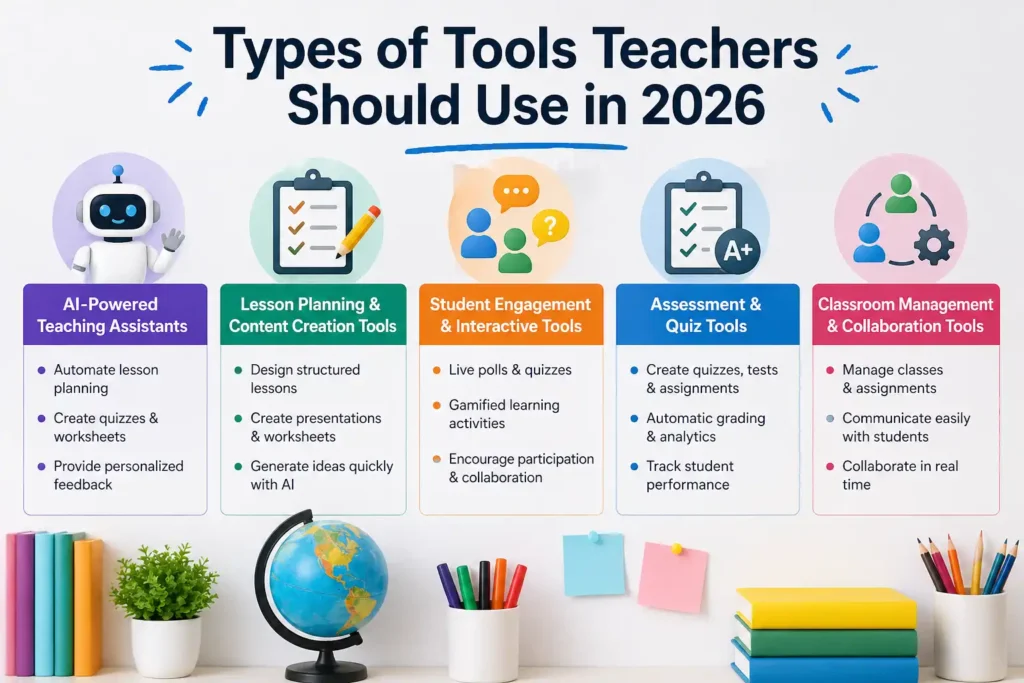
Not all teaching tools serve the same purpose. In 2026, educators will rely on a mix of specialized tools designed for different tasks, such as lesson planning, engagement, and assessment. Understanding these categories helps teachers choose the right combination instead of relying on a single solution. AI-powered assistants, interactive tools, and classroom management platforms each play a unique role in improving efficiency and learning outcomes. By combining these tools strategically, teachers can create a more dynamic and personalized learning experience that adapts to student needs while also simplifying their own workload significantly.
AI-Powered Teaching Assistants
AI teaching assistants help automate lesson creation, grading, and feedback. These tools can generate worksheets, quizzes, and even personalized learning paths. They act like a virtual assistant for teachers, saving hours of manual work and allowing educators to focus more on teaching and student interaction.
Lesson Planning & Content Creation Tools
These tools help teachers design structured lessons quickly. From presentations to worksheets, content creation tools simplify the process. Many platforms now use AI to generate lesson ideas based on curriculum standards, making it easier for teachers to maintain consistency while saving time.
Student Engagement & Interactive Tools
Engagement tools focus on making lessons interactive through quizzes, polls, and activities. Studies show that active learning improves student performance significantly. These tools help teachers capture attention, encourage participation, and make learning more enjoyable for students across different age groups.
Assessment & Quiz Tools
Assessment tools allow teachers to create quizzes, tests, and assignments efficiently. They also provide instant grading and analytics, helping teachers identify learning gaps quickly. This data-driven approach improves decision-making and ensures that students receive timely feedback on their performance.
Classroom Management & Collaboration Tools
Classroom management tools help organize tasks, communication, and collaboration. Teachers can assign work, track progress, and communicate with students in one place. These tools are especially useful in hybrid and online learning environments where coordination is critical for success.
10 Best Tools for Teachers in 2026 (Detailed List)
1. MagicSchool AI
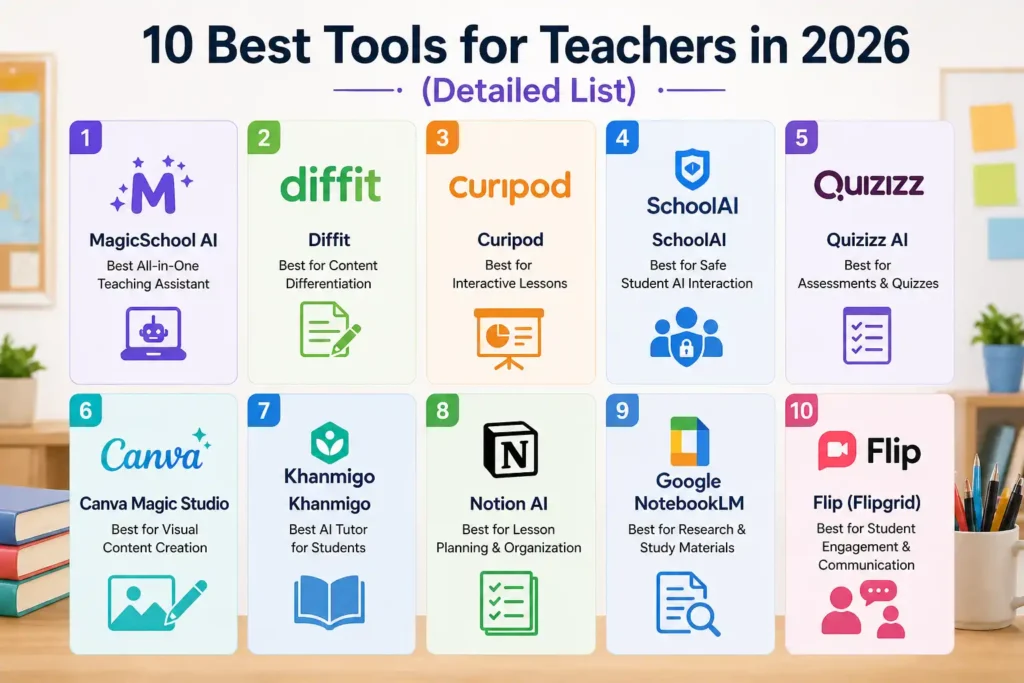
MagicSchool AI is designed specifically for educators, offering tools for lesson planning, assessments, and communication. It simplifies daily teaching tasks using AI, making it one of the most comprehensive platforms available today. Teachers can generate high-quality teaching materials quickly without compromising on quality or accuracy.
2. Diffit
Diffit helps teachers adapt content for different student levels. It can rewrite text, simplify concepts, and create customized materials. This makes it ideal for classrooms with mixed learning abilities, ensuring that every student gets content suited to their understanding level.
3. Curipod
Curipod focuses on engagement by allowing teachers to create interactive presentations. Students can participate through live polls, questions, and activities. This keeps classrooms dynamic and encourages active participation instead of passive learning.
4. SchoolAI
SchoolAI provides a managed AI environment for school students. It ensures safe and monitored interactions while allowing students to explore AI-based learning. Teachers can guide student usage while maintaining privacy and safety standards.
5. Quizizz AI
Quizizz AI allows teachers to create quizzes instantly with automated grading. It also offers gamified elements, making assessments more engaging. Teachers can track student performance in real time and adjust lessons accordingly.
💚 You might also like: How to Optimize Website Speed in 2026 (Step-by-Step Guide)
6. Canva Magic Studio
Canva Magic Studio helps teachers create visually appealing presentations, worksheets, and graphics. Its AI features allow quick design generation, making it easier to produce professional-quality materials without design skills.
7. Khanmigo
Khanmigo acts as an AI tutor, providing personalized guidance to students. It helps explain concepts, answer questions, and support independent learning. This tool is especially useful for reinforcing classroom teaching outside school hours.
8. Notion AI
Notion AI helps teachers organize lesson plans, notes, and resources in one place. Its AI features assist in content generation and task management, making it easier to stay organized and productive.
9. Google NotebookLM
NotebookLM helps teachers and students organize research and create structured study materials. It uses AI to summarize information and generate insights, making it easier to manage large amounts of content efficiently.
10. Flip (Flipgrid)
Flip allows students to share video responses and participate in discussions. It encourages communication and creativity while giving every student a voice. Teachers can use it to build a more interactive and inclusive classroom environment.
💚 You might also like: Best Social Media Marketing Tips for Growth in 2026
Comparison of the Best Teaching Tools in 2026
With so many teaching tools available, choosing the right one can feel overwhelming. Each platform offers different strengths, from AI-powered automation to interactive learning features. That’s why comparing tools side by side helps teachers make better decisions based on their needs. Some tools focus on saving time, while others are built for engagement or assessment. According to EdTech Digest, schools that use a combination of tools see up to 30 percent improvement in student performance. A clear comparison helps identify which tool fits your workflow, teaching style, and classroom goals without unnecessary trial and error or wasted time.
| Tool Name | Best For | Key Features | Ease of Use | Pricing | Ideal Users |
| MagicSchool AI | All-in-one teaching assistant | Lesson planning, AI content generation, assessments | Very Easy | Free + Paid | Busy teachers, schools |
| Diffit | Content differentiation | Text simplification, level-based content, worksheets | Easy | Free + Paid | Mixed-ability classrooms |
| Curipod | Interactive lessons | Live polls, presentations, engagement tools | Easy | Free + Paid | K-12 teachers |
| SchoolAI | Safe AI for students | Controlled AI interaction, monitoring tools | Moderate | Paid | Schools, institutions |
| Quizizz AI | Assessments & quizzes | Auto quiz generation, gamification, analytics | Very Easy | Free + Paid | Teachers, tutors |
| Canva Magic Studio | Visual content creation | AI design tools, presentations, graphics | Very Easy | Free + Paid | All educators |
| Khanmigo | AI tutoring | Personalized tutoring, concept explanations | Easy | Paid | Students, teachers |
| Notion AI | Planning & organization | Notes, lesson planning, AI writing | Moderate | Free + Paid | Advanced users |
| Google NotebookLM | Research & study | Summarization, notes, AI insights | Moderate | Free | Researchers, teachers |
| Flip (Flipgrid) | Student engagement | Video discussions, communication tools | Very Easy | Free | Classroom engagement |
How to Choose the Right Tool for Your Teaching Needs
Selecting the right teaching tool depends on your specific goals, classroom setup, and student needs. There is no one-size-fits-all solution. Some teachers need tools for online teaching, while others focus on in-person engagement. Budget also plays a major role, especially for independent educators. A 2024 survey by EdWeek found that 70 percent of teachers prefer tools that integrate easily with their existing systems. The key is to prioritize simplicity, effectiveness, and scalability. Instead of using too many tools, it is better to choose a few that align well with your workflow and deliver consistent results over time.
Based on Subject & Grade Level
Different subjects require different tools. For example, STEM teachers may need simulation-based platforms, while language teachers benefit from communication tools. Younger students require more interactive and visual tools, while older students can handle advanced platforms. Choosing tools based on grade level ensures better learning outcomes and engagement.
Based on Teaching Style (Online vs Classroom)
Teaching style plays a big role in tool selection. Online teachers need tools that support video, collaboration, and remote assessments. Classroom teachers may focus more on engagement and presentation tools. Hybrid teaching requires a balance of both, making flexibility an important factor when choosing the right platform.
Based on Budget & School Requirements
Budget constraints often influence tool selection. Free tools are useful for basic needs, but premium tools offer advanced features and better support. Schools may also have specific requirements regarding data privacy and integration. It is important to choose tools that meet both financial and institutional expectations.
Benefits of Using AI Tools in Teaching in 2026
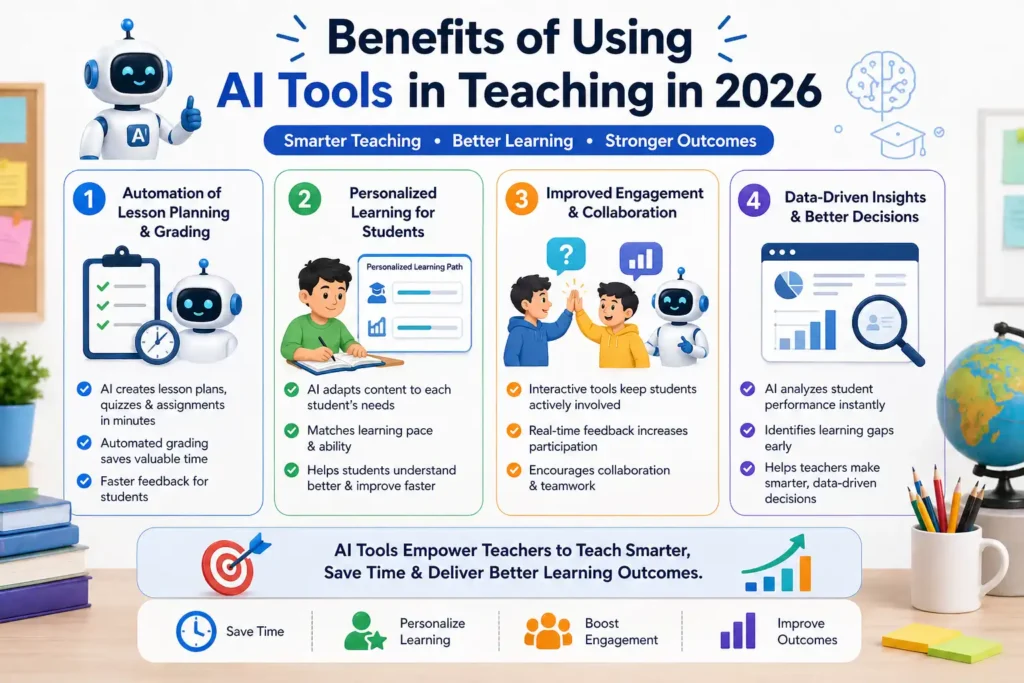
AI tools are becoming a core part of modern education, helping teachers improve efficiency and personalize learning. These tools can analyze student performance, generate content, and provide real-time feedback. According to a report by the World Economic Forum, AI in education can reduce teacher workload by up to 30 percent while improving student outcomes. In 2026, AI is not just an add-on but a necessity for competitive and effective teaching. When used correctly, it enhances both teaching quality and student experience, making classrooms more adaptive, responsive, and focused on individual learning needs across different environments.
Automation of Lesson Planning & Grading
AI tools can automate repetitive tasks like lesson planning and grading. Teachers can generate quizzes, assignments, and even full lesson outlines within minutes. Automated grading also ensures faster feedback for students, improving learning efficiency while reducing the time teachers spend on manual evaluation tasks.
Personalized Learning for Students
Personalization is one of the biggest advantages of AI in education. Tools can adapt content based on student interest, their performance, and learning pace. This ensures that each student gets the right level of difficulty, helping them understand concepts better and progress more effectively over time.
Improved Engagement & Collaboration
AI tools enhance engagement by making learning interactive and dynamic. Features like real-time feedback, gamification, and collaboration tools keep students involved. This leads to better participation and improved retention, making lessons more effective and enjoyable for both teachers and students.
Future of Teaching
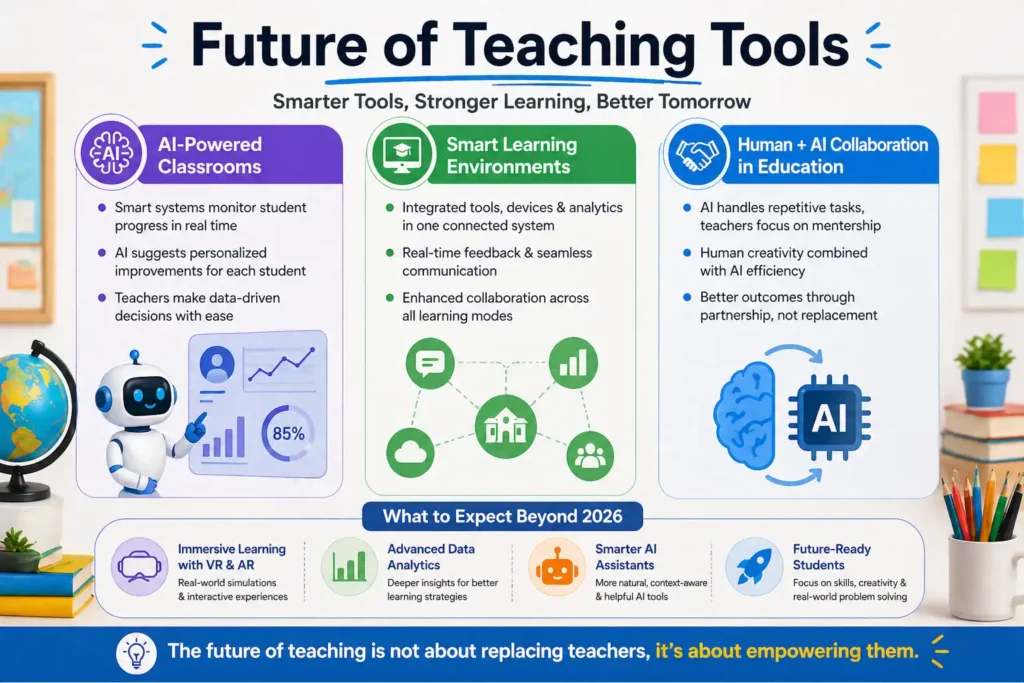
The future of teaching tools is closely tied to advancements in AI, virtual reality, and data analytics. Classrooms are expected to become more personalized, with tools that adapt in real time to student needs. According to Gartner, AI-driven education platforms will become standard in most institutions within the next five years. We can also expect more immersive learning experiences through AR and VR technologies. The role of teachers will evolve from content delivery to guidance and mentorship. These changes will create a more flexible and student-centered education system that focuses on skills, creativity, and real-world problem solving.
AI-Powered Classrooms
AI-powered classrooms will use smart systems to monitor progress, suggest improvements, and personalize lessons. These systems will help teachers make data-driven decisions while ensuring that each student receives attention based on their individual learning needs and performance levels.
Smart Learning Environments
Smart classrooms will integrate devices, software, and analytics into a unified system. This will allow seamless communication, real-time feedback, and improved collaboration. Such environments will enhance both teaching efficiency and student engagement across different learning formats.
Human + AI Collaboration in Education
The future of education lies in collaboration between humans and AI. Teachers will use AI to enhance their capabilities rather than replace them. This partnership will lead to better outcomes, combining human creativity with the efficiency and scalability of technology.
💚 You might also like: Best AI Tools for Beginners: Top Picks for 2026
Conclusion
Teaching in 2026 is more dynamic and technology-driven than ever before. The right tools can significantly improve productivity, engagement, and learning outcomes. However, success depends on choosing tools that align with your teaching style and goals. Instead of chasing every new platform, it is better to focus on tools that deliver real value. By combining AI capabilities with traditional teaching methods, educators can create a balanced and effective learning environment. As technology continues to evolve, teachers who adapt and embrace these tools will be better positioned to succeed in modern classrooms and provide high-quality education.
FAQs
What is the best free tool for teachers?
Several free tools offer great value, including Canva, Quizizz, and Google tools. These platforms provide essential features without cost, making them ideal for teachers who are just starting or working with limited budgets in schools or independent setups.
Are AI tools safe for classrooms?
Most AI tools are safe if used responsibly and chosen carefully. Teachers should select platforms that follow data protection standards and ensure student privacy. Proper monitoring and guidelines can help maintain a safe and secure learning environment.
Which tool is best for lesson planning?
Notion AI and MagicSchool AI are very good tools for lesson planning. They help teachers organize content, generate ideas, and streamline workflows. These tools reduce the time spent on planning while maintaining quality and consistency in lessons.
Can these tools replace teachers?
Teaching tools are designed to support teachers, not replace them. Human interaction, guidance, and emotional intelligence cannot be replaced by technology. These tools simply enhance efficiency and improve the overall teaching and learning experience.
How do I choose the right teaching tool?
Start by identifying your needs, whether it is engagement, planning, or assessment. Then evaluate tools based on ease of use, features, and budget. Choosing a few well-suited tools is more effective than using too many platforms at once.
✨ Tech made simple, follow Tech Fueler for more...