
Introduction
Website speed refers to how quickly your web pages load and become interactive for users. In today’s fast-moving digital environment, even a one-second delay can significantly impact user behavior. Research by Google shows that as page load time increases from 1 to 3 seconds, the probability of bounce rises by 32%. Speed optimization is essential not only for better rankings but also for improved user experience and higher conversions. A fast-loading website keeps visitors engaged, reduces frustration, and ultimately increases trust, making it a critical factor for online success in 2026 and beyond.
What is Website Speed Optimization?
Website speed optimization is the process of improving how fast a website loads and responds to user interactions. It involves technical improvements like reducing file sizes, optimizing code, and enhancing server performance, alongside user-focused elements such as perceived load time. Page load time measures actual speed, while perceived speed reflects how fast users feel the site is loading. Key metrics include load time, time to first byte (TTFB), and interactivity. Proper optimization ensures a smooth, seamless experience that aligns with both user expectations and search engine ranking algorithms, especially as performance standards continue evolving.
Why Website Speed Matters (SEO & Business Impact)
Impact on User Experience (UX)
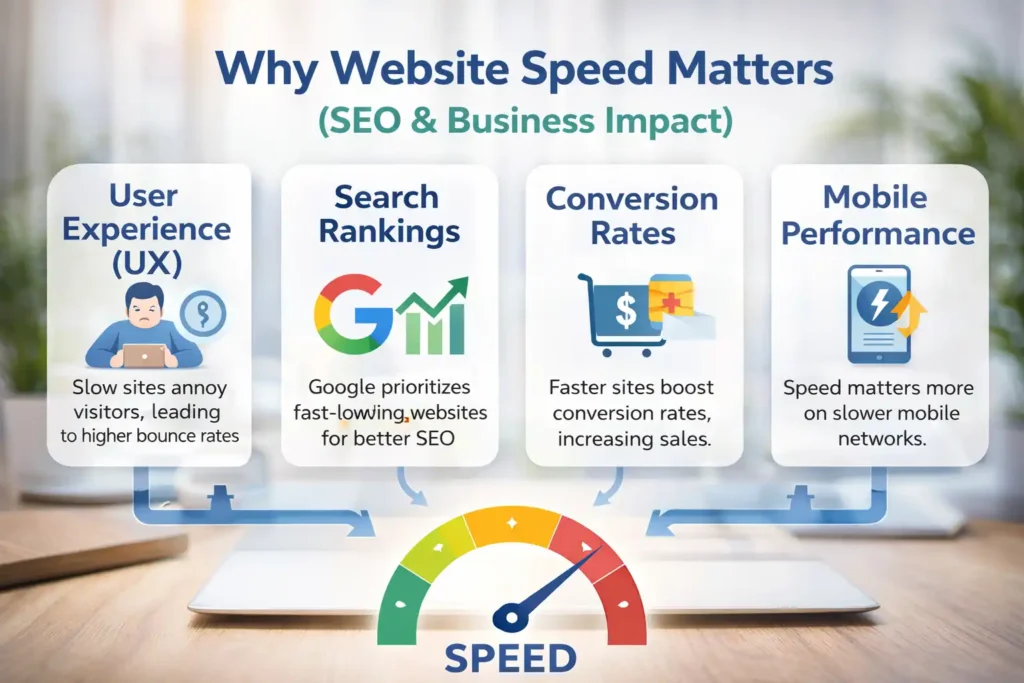
Website speed is very important for user experience. Slow-loading pages frustrate users and often lead to higher bounce rates. Studies reveal that 53% of mobile users abandon a site if it takes longer than 3 seconds to load. A fast website ensures smoother navigation, quicker access to content, and a more enjoyable browsing experience, encouraging users to stay longer and explore more pages.
Impact on Search Engine Rankings
Search engines like Google use page speed as a ranking factor, especially after the introduction of Core Web Vitals. Faster websites are more likely to rank higher in search results because they provide a better user experience. Google prioritizes sites that load quickly, are stable, and responsive, making speed optimization a key component of any successful SEO strategy.
Conversion Rate Optimization (CRO)
Website speed directly affects conversion rates. According to research by Akamai, a 1-second delay in page load time can reduce conversions by up to 7%. Faster websites build trust and reduce friction in the user journey, making visitors more likely to complete actions such as purchases, sign-ups, or inquiries, ultimately boosting revenue.
Mobile vs Desktop Performance Importance
With mobile traffic dominating the web, optimizing speed for mobile devices is more important than ever. Mobile users often rely on slower networks, making performance optimization critical. Google also uses mobile-first indexing, meaning your mobile site’s speed and performance directly impact rankings, making mobile optimization a top priority.
💚 You might also like: Best Social Media Marketing Tips for Growth in 2026
Core Web Vitals Explained
Largest Contentful Paint (LCP)
Largest Contentful Paint measures how long it takes for the main content of a page to load. Ideally, LCP should occur within 2.5 seconds of when the page starts loading. A slow LCP often indicates issues with server response time, large images, or render-blocking resources, all of which need optimization for better performance.
First Input Delay (FID) / Interaction to Next Paint (INP)
FID measures the time it takes for a page to respond to a user’s first interaction, while INP is a newer metric focusing on overall responsiveness. A good INP score is under 200 milliseconds. Poor responsiveness often results from heavy JavaScript execution, which delays user interactions and affects usability.
Cumulative Layout Shift (CLS)
Cumulative Layout Shift evaluates visual stability by measuring unexpected layout movements during page loading. A good CLS score is below 0.1. Layout shifts usually happen due to unoptimized images, ads, or dynamically loaded content, which can frustrate users and lead to accidental clicks or a poor experience.
Ideal Benchmark Values
To meet Google’s performance standards, aim for LCP under 2.5 seconds, INP below 200 milliseconds, and CLS under 0.1. These benchmarks ensure a fast, responsive, and stable user experience. Consistently meeting these thresholds helps improve search rankings, user engagement, and overall website performance.
How to Test Website Speed (Tools & Methods)
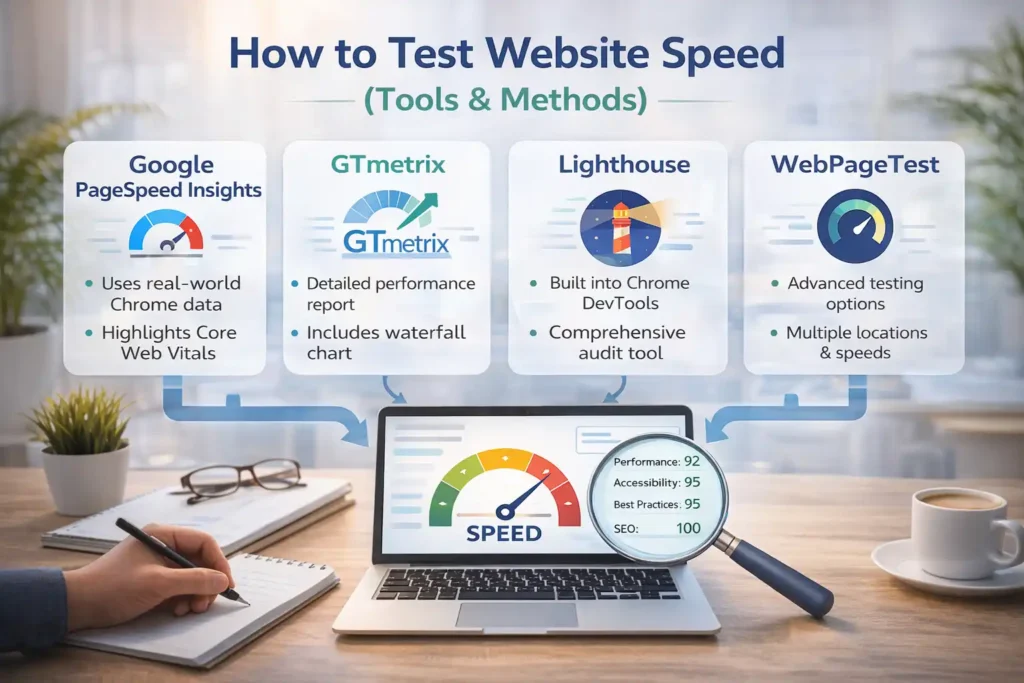
Google PageSpeed Insights
Google PageSpeed Insights is one of the most popular tools for analyzing website speed. It provides both mobile and desktop performance scores along with actionable recommendations. The tool uses real-world data from Chrome users and highlights Core Web Vitals, making it essential for identifying performance issues and tracking improvements effectively.
GTmetrix
GTmetrix offers detailed performance reports, including page load time, total page size, and request count. It combines data from Lighthouse and other performance tools to provide in-depth insights. The waterfall chart feature helps identify bottlenecks, making it easier to diagnose slow-loading elements and optimize them efficiently.
Lighthouse
Lighthouse is an open-source tool integrated into Chrome DevTools that audits website performance, accessibility, and SEO. It provides a comprehensive report with performance scores and optimization suggestions. Developers widely use it to identify issues related to speed and improve overall site performance through actionable insights.
WebPageTest
WebPageTest allows advanced testing with multiple locations, browsers, and connection speeds. It provides detailed metrics like time to first byte and fully loaded time. This tool is especially useful for analyzing real-world performance scenarios and identifying specific elements slowing down your website.
How to Interpret Reports
Understanding speed reports is crucial for optimization. Focus on key metrics like load time, Core Web Vitals, and blocking resources. Prioritize issues marked as high impact, such as large images or unused JavaScript. Regular testing and monitoring help ensure continuous performance improvements and a better user experience.
💚 You might also like: Technology Trends 2026: AI, IoT, Cybersecurity, Robotics & More
Top Factors Affecting Website Speed
Hosting Performance
Your hosting provider significantly impacts website speed. Slow servers increase response time, affecting overall performance. Choosing high-quality hosting with fast server infrastructure, SSD storage, and optimized configurations ensures quicker data delivery and improved load times for users across different locations.
Image Sizes & Formats
Large, unoptimized images are one of the biggest causes of slow websites. Using compressed images and modern formats like WebP or AVIF reduces file size without compromising quality. Proper image optimization significantly improves load speed and enhances overall site performance.
Excessive JavaScript & CSS
Heavy and unoptimized JavaScript and CSS files can block page rendering and delay loading. Minimizing, compressing, and removing unused code helps reduce file size and improve performance. Efficient code management ensures faster rendering and better user experience.
Too Many HTTP Requests
Each element on a webpage requires an HTTP request. Too many requests slow down loading time. Reducing unnecessary elements, combining files, and optimizing resources can significantly decrease the number of requests and improve site speed.
Lack of Caching
Caching stores website data temporarily, reducing the need to reload resources every time a user visits. Without caching, websites load more slowly. Implementing browser and server caching improves performance and reduces server load.
Unoptimized Databases
Large and cluttered databases slow down website performance. Regular cleanup, removing unnecessary data, and proper indexing help improve database efficiency and speed up content retrieval processes.
Third-Party Scripts
External scripts like ads, analytics, and widgets can slow down your website. Limiting third-party integrations and loading them efficiently helps reduce delays and ensures better overall performance.
Step-by-Step Guide to Optimize Website Speed
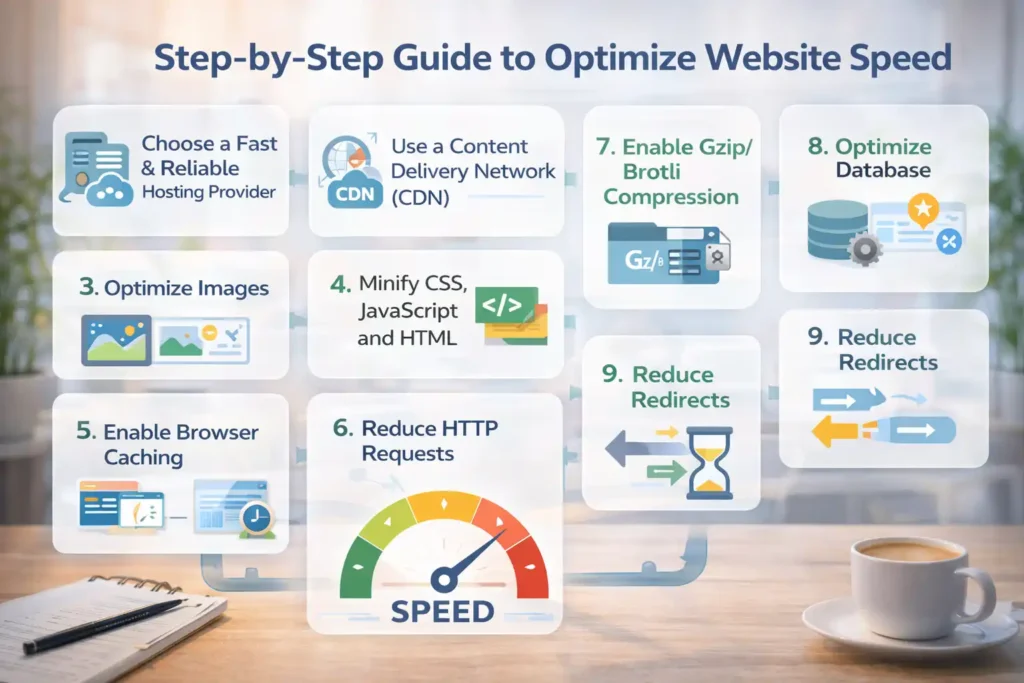
Optimizing website speed requires a structured, step-by-step approach that targets both front-end and back-end performance issues. Instead of relying on a single fix, high-performing websites implement multiple optimizations working together. According to Google, reducing page load time from 3 seconds to under 2 seconds can significantly improve user engagement and conversions. This section covers proven techniques used by top-performing websites, from choosing the right hosting to optimizing media and code. By implementing these steps, you can create a faster, more responsive website that meets modern performance standards and delivers an excellent user experience.
1. Choose a Fast & Reliable Hosting Provider
Your hosting provider forms the foundation of your website’s performance. Shared hosting is affordable but often slower due to limited resources, while VPS and cloud hosting offer better speed and scalability. Studies show server response time should be under 200 milliseconds for optimal performance. Choosing a provider with SSD storage, global data centers, and optimized servers ensures faster load times and consistent performance.
2. Use a Content Delivery Network (CDN)
A CDN distributes your website’s content across multiple global servers, allowing users to load data from the nearest location. This reduces latency and speeds up delivery. Research by Cloudflare shows CDNs can reduce load times by up to 50% for global users. Using a CDN also improves reliability and helps handle traffic spikes efficiently.
3. Optimize Images
Images often account for more than 50% of a webpage’s total size, making optimization critical. Compress images using tools like TinyPNG, and use next-gen formats such as WebP or AVIF for better efficiency. Implement lazy loading so images load only when visible on screen. These techniques reduce page weight and significantly improve loading speed.
4. Minify CSS, JavaScript, and HTML
Minification removes unnecessary characters like spaces and comments from code, reducing file size. Small-sized files load faster and improve downloading speed. Tools and plugins can automate this process while also removing unused code. Efficient code optimization reduces blocking resources and ensures faster page rendering, especially on mobile devices.
5. Enable Browser Caching
Browser caching stores static resources like images, CSS, and JavaScript on a user’s device, reducing load time on repeat visits. By setting proper cache durations, you minimize server requests and improve speed. According to Yahoo’s performance guidelines, caching can reduce page load time by up to 80% for returning visitors.
6. Reduce HTTP Requests
Each file on a webpage requires a separate HTTP request, which increases load time. Reducing requests by combining CSS and JavaScript files, removing unnecessary plugins, and simplifying design elements can significantly improve speed. Fewer requests mean faster communication between the browser and server, leading to quicker page loads.
7. Enable Gzip/Brotli Compression
Compression reduces the size of files sent from the server to the browser. Gzip and Brotli are widely used compression methods that can shrink file sizes by up to 70%. Smaller files load faster, improving overall performance. Enabling compression is a simple yet highly effective way to enhance website speed.
8. Optimize Database
A clean and well-structured database improves data retrieval speed. Over time, databases accumulate unnecessary data such as revisions and spam entries. Regular cleanup and proper indexing help maintain efficiency. Optimizing your database ensures faster queries, which directly impacts overall website performance.
💚 You might also like: Best AI Tools for Beginners: Top Picks for 2026
9. Reduce Redirects
Redirects create additional HTTP requests, increasing load time. Each redirect adds a delay, especially on mobile networks. Minimizing unnecessary redirects and ensuring proper URL structure improves speed. Keeping navigation simple and direct helps reduce latency and enhances user experience.
10. Use Lazy Loading for Media
Lazy loading delays the loading of images and videos until they are needed, reducing initial page load time. This technique improves performance, especially for media-heavy websites. By loading only visible content first, users experience faster page rendering and smoother interaction.
11. Optimize Fonts
Web fonts can impact performance if not optimized properly. Limiting font families and variants reduces file size and loading time. Using system fonts where possible eliminates additional requests. Proper font optimization ensures faster rendering and avoids delays caused by external font files.
Advanced Website Speed Optimization Techniques
Once basic optimizations are implemented, advanced techniques can further enhance performance. These strategies focus on improving how resources are loaded and processed by the browser. High-performing websites often use these methods to achieve near-instant loading speeds. According to web performance studies, advanced optimizations can improve load times by an additional 20–30%. While they may require technical expertise, the benefits in terms of speed, user experience, and SEO are substantial, especially for large or high-traffic websites aiming to stay competitive.
Code Splitting
Code splitting divides large JavaScript files into smaller chunks that load only when needed. This reduces initial load time and improves performance. Instead of loading the entire codebase at once, users download only the necessary parts, resulting in faster rendering and better user experience.
Preloading & Prefetching Resources
Preloading and prefetching help browsers prioritize important resources. Preloading ensures critical files load immediately, while prefetching loads resources for future navigation. These techniques reduce waiting time and improve perceived speed, making the website feel faster to users.
Critical CSS Implementation
Critical CSS involves loading only the styles required for above-the-fold content first. This allows the visible part of the page to render quickly while the rest loads in the background. It significantly improves perceived performance and reduces render-blocking delays.
HTTP/2 and HTTP/3 Usage
Modern protocols like HTTP/2 and HTTP/3 improve data transfer efficiency by allowing multiple requests to be sent simultaneously. They reduce latency and improve loading speed compared to older protocols. Using updated server configurations ensures better performance and faster content delivery.
Server-Side Rendering (SSR) vs Static Generation
Server-side rendering generates pages on the server before sending them to the browser, improving load speed and SEO. Static generation pre-builds pages for instant delivery. Both methods enhance performance by reducing client-side processing and ensuring faster content display.
Mobile Speed Optimization Tips
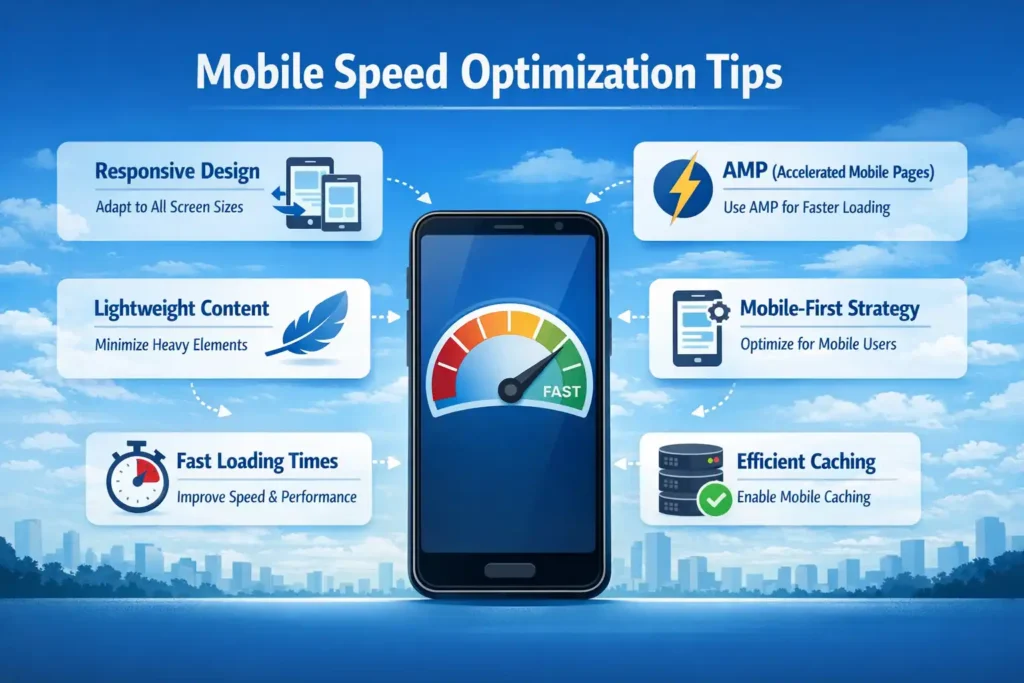
With over 60% of global web traffic coming from mobile devices, optimizing for mobile speed is no longer optional. Mobile users often experience slower connections, making performance optimization critical. Google’s mobile-first indexing means your site’s mobile version directly affects rankings. By focusing on responsive design, lightweight content, and efficient loading techniques, you can ensure your website performs well across all devices and delivers a seamless experience to mobile users.
Responsive Design Best Practices
Responsive design ensures your website adapts to different screen sizes and devices. Using flexible layouts, optimized images, and scalable elements improves performance. A well-designed responsive site reduces unnecessary loading and provides a consistent user experience across all devices.
AMP (Accelerated Mobile Pages)
AMP is a framework designed to create fast-loading mobile pages. It uses simplified HTML and optimized resources to improve speed. While not suitable for every website, AMP can significantly enhance performance for content-heavy pages like blogs and news sites.
Mobile-first Optimization Strategy
Mobile-first optimization focuses on designing for mobile devices before scaling up to larger screens. This approach ensures essential content loads quickly and efficiently. Prioritizing mobile performance helps improve rankings and provides a better experience for the majority of users.
Common Website Speed Mistakes to Avoid
Many website owners unknowingly make mistakes that negatively impact performance. Avoiding these common issues is just as important as implementing optimizations. Overusing plugins, using heavy themes, ignoring mobile performance, and failing to test regularly can slow down your site significantly. Research shows that poorly optimized websites lose a large percentage of potential visitors due to slow loading times. By identifying and fixing these mistakes, you can maintain a fast, efficient website that delivers consistent performance and meets both user expectations and search engine requirements.
💚 You might also like: How to Start a Digital Agency Step by Step in 2026
Best Tools & Plugins for Speed Optimization
Using the right tools and plugins can significantly simplify the process of optimizing website speed. Instead of manually handling every technical aspect, these tools automate tasks like caching, compression, and performance monitoring. According to industry data, websites that use performance optimization tools see up to a 40% improvement in load times. From WordPress plugins to image compression tools and analytics platforms, selecting the right combination ensures consistent performance improvements. These tools not only help identify issues but also provide actionable recommendations, making it easier to maintain a fast and efficient website.
WordPress Optimization Plugins
WordPress plugins like WP Rocket, LiteSpeed Cache, and W3 Total Cache help improve speed through caching, minification, and database optimization. These tools automate complex tasks and reduce manual effort. Proper configuration of these plugins can significantly enhance performance, especially for content-heavy websites.
Image Optimization Tools
Tools like TinyPNG, ImageOptim, and ShortPixel compress images without losing quality. Since images make up a large portion of page size, optimizing them can drastically reduce load times. Using these tools ensures faster image delivery and better overall website performance.
Performance Monitoring Tools
Monitoring tools like Google PageSpeed Insights, GTmetrix, and Pingdom help track website performance over time. They provide detailed reports and suggestions for improvement. Regular monitoring ensures that performance issues are identified and resolved quickly, maintaining optimal speed.
How to Maintain Website Speed Over Time
Website speed optimization is not a one-time task but an ongoing process. As you add new content, plugins, and features, performance can gradually decline if not monitored regularly. Studies show that websites that conduct routine performance audits maintain up to 25% better load times compared to those that don’t. Regular updates, performance testing, and proactive optimization are essential for sustaining speed. By consistently monitoring Core Web Vitals and fixing emerging issues, you can ensure your website remains fast, responsive, and competitive in search rankings over time.
Regular Audits
Conducting regular speed audits helps identify performance issues before they impact users. Using tools like PageSpeed Insights or GTmetrix, you can track improvements and detect new problems. Consistent audits ensure your website maintains optimal performance standards.
Monitoring Core Web Vitals
Keeping an eye on Core Web Vitals ensures your website meets Google’s performance benchmarks. Regular monitoring helps detect issues with loading speed, responsiveness, and visual stability. Maintaining good scores improves both user experience and search rankings.
Updating Plugins/Themes
Outdated plugins and themes can slow down your website and create security risks. Regular updates ensure compatibility, improved performance, and bug fixes. Keeping your website updated helps maintain speed and overall efficiency.
FAQs About Website Speed Optimization
What is the ideal page load time?
The ideal page load time is under 2 seconds, with 3 seconds considered the maximum acceptable limit. Research by Google indicates that bounce rates increase significantly beyond this threshold. Faster loading times improve user engagement, retention, and overall satisfaction.
Is a CDN necessary for every website?
A CDN is not mandatory but highly recommended, especially for websites with global audiences. It improves speed by delivering content from servers closer to users. For high-traffic or international websites, a CDN can significantly enhance performance and reliability.
Are free tools enough for optimization?
Free tools can handle basic optimization tasks effectively, such as performance testing and image compression. However, premium tools often provide advanced features like automated optimization, deeper insights, and better support, making them valuable for larger or professional websites.
How often should I test my website speed?
It is recommended to test website speed at least once a month or after major updates. Regular testing helps identify new issues and ensures consistent performance. Frequent monitoring is key to maintaining optimal website speed over time.
Conclusion
Optimizing website speed is essential for delivering a seamless user experience and achieving strong search engine rankings. From choosing the right hosting provider to implementing advanced techniques like code splitting and caching, every step plays a role in improving performance. Research consistently shows that faster websites lead to higher engagement, lower bounce rates, and increased conversions. By following a structured optimization strategy and maintaining performance over time, you can ensure your website stays competitive in an increasingly fast-paced digital landscape. Start implementing these strategies today to create a faster, more efficient, and user-friendly website.
✨ Don’t stop here, follow Tech Fueler for daily upgrades.