
What Is Google Meet?
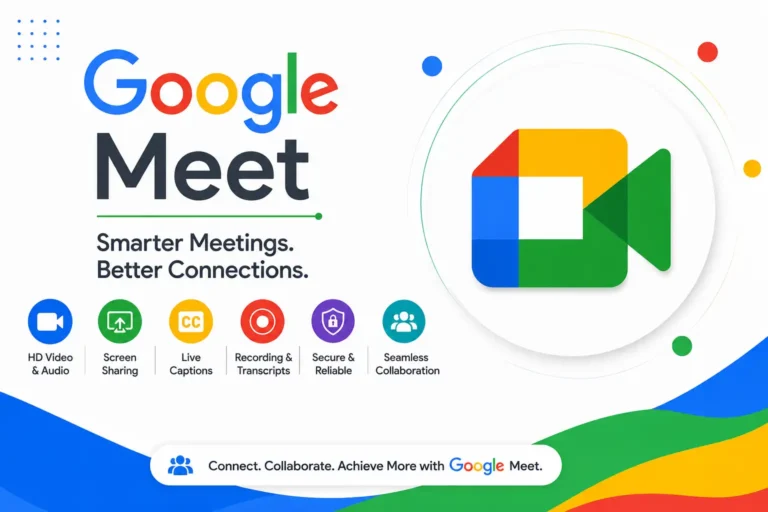
Google Meet is Google’s cloud-based video conferencing platform designed for secure online meetings, virtual collaboration, webinars, remote work, and online learning. As part of Google Workspace, it integrates seamlessly with Gmail, Google Calendar, Google Drive, and Gemini AI, making it easy to schedule, join, and manage meetings from one ecosystem. Businesses, educators, freelancers, and individuals use Google Meet because it delivers reliable HD video, enterprise-grade security, and AI-powered productivity features. With cross-platform support for desktop and mobile devices, Google Meet enables teams to communicate efficiently from virtually anywhere.
Key Features of Google Meet
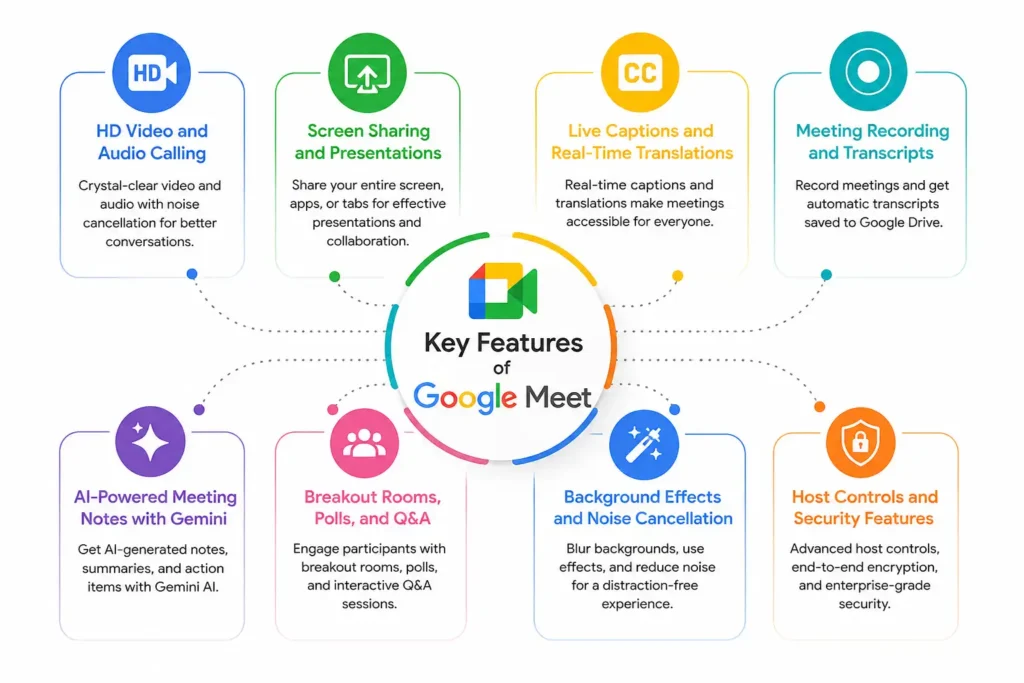
HD Video and Audio Calling
Google Meet supports high-definition video meetings with adaptive audio that automatically adjusts to changing network conditions. AI-powered noise cancellation helps reduce background distractions, creating clearer conversations even in busy environments. Depending on your Google Workspace plan, meetings can support hundreds of participants while maintaining reliable performance. This combination of video quality, voice clarity, and connection stability makes Google Meet suitable for professional business meetings, client presentations, and virtual classrooms.
Screen Sharing and Presentations
Google Meet allows participants to present their entire screen, a browser tab, or a single application window with just a few clicks. This flexibility makes product demonstrations, team updates, training sessions, and online classes more engaging. Clear screen sharing improves communication and helps attendees follow presentations more effectively.
Live Captions and Real-Time Translations
Google Meet uses Google’s advanced speech recognition technology to generate live captions during meetings, making conversations more accessible for participants with hearing difficulties or language barriers. Selected Google Workspace plans also include AI-powered translated captions that help multilingual teams collaborate more naturally. These accessibility features improve understanding, reduce communication gaps, and support inclusive meetings across global organizations working in different languages.
Meeting Recording and Transcripts
Google Meet enables eligible Google Workspace users to record meetings and automatically save recordings to Google Drive for future reference. AI-generated meeting transcripts simplify reviewing discussions, documenting decisions, and sharing information with absent team members. Instead of relying on handwritten notes, organizations can maintain searchable meeting records that improve accountability, knowledge sharing, and project documentation while saving valuable administrative time.
AI-Powered Meeting Notes with Gemini
Gemini AI enhances Google Meet by automatically generating meeting notes, summarizing discussions, identifying action items, and highlighting key decisions. Instead of manually documenting conversations, participants can stay focused on meaningful collaboration while AI captures important details. These intelligent summaries improve follow-up efficiency, reduce missed tasks, and help teams quickly review meeting outcomes, making productivity significantly higher across recurring business meetings.
Breakout Rooms, Polls, and Q&A
Google Meet includes interactive collaboration tools such as breakout rooms, live polls, and Q&A sessions that encourage participation during meetings. Educators can divide students into smaller discussion groups, while businesses can collect instant feedback or answer audience questions during presentations. These engagement features transform standard video calls into interactive experiences, improving collaboration, learning outcomes, and audience involvement across virtual events.
Background Effects and Noise Cancellation
Google Meet provides virtual backgrounds, background blur, studio-quality enhancements, and AI-powered noise cancellation to create a more professional meeting environment. These features reduce visual distractions while filtering unwanted sounds such as keyboard typing, traffic, or household noise. Users can confidently participate from different locations without compromising meeting quality, making remote work feel more polished and productive.
Host Controls and Security Features
Google Meet includes enterprise-level security features designed to protect meetings from unauthorized access. Hosts can control participant permissions, approve join requests, mute attendees, remove disruptive users, and manage screen sharing. Google also protects meetings with encryption during data transmission and follows strict security standards across Google Workspace. These safeguards help businesses, schools, and organizations conduct confidential meetings with greater confidence.
How to Use Google Meet (Step-by-Step Guide)
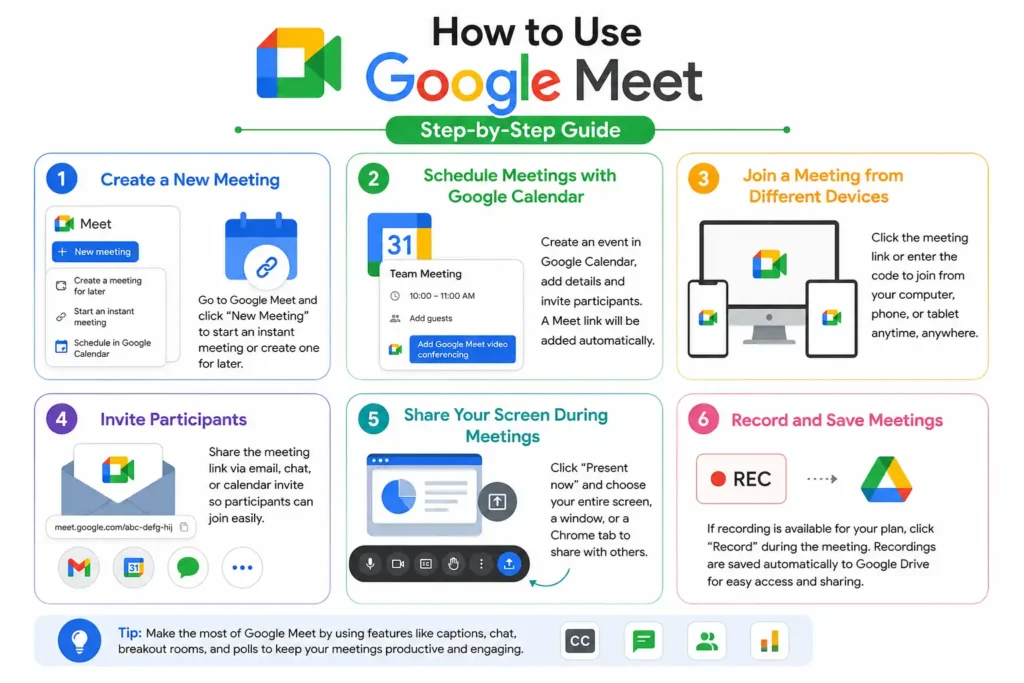
Getting started with Google Meet requires only a Google account and an internet connection. Users can create meetings instantly, schedule future sessions, invite participants, share presentations, and record discussions using simple built-in tools. Because Meet integrates with Google Workspace, the entire workflow remains organized within Gmail, Calendar, and Drive. Whether you’re hosting a client meeting, online class, or team collaboration session, learning these essential steps helps you maximize productivity while delivering a smooth virtual meeting experience.
Create a New Meeting
Open Google Meet and select New Meeting to instantly generate a secure meeting link. Meeting organizers automatically receive host controls that allow them to manage attendees, security settings, and collaboration features throughout the session with minimal setup.
Schedule Meetings with Google Calendar
Google Calendar makes scheduling Google Meet sessions effortless by automatically generating a unique meeting link when creating an event. Add participants, select the meeting time, include an agenda, and send invitations instantly. Calendar reminders help attendees join on time, while updates automatically sync across Google Workspace, reducing scheduling errors and improving meeting organization.
Join a Meeting from Different Devices
Participants can join Google Meet using a desktop browser, Android phone, iPhone, tablet, or supported meeting room hardware. Simply click the meeting link or enter the meeting code without installing complex software on most browsers. Cross-device compatibility allows users to switch devices easily while maintaining a reliable meeting experience from virtually any location.
Invite Participants
Google Meet lets organizers invite attendees by sharing a meeting link, entering email addresses, or sending invitations through Google Calendar. Participants receive instant notifications and can join with minimal effort. This simple invitation process supports internal teams, external clients, vendors, and guests, making collaboration efficient regardless of where participants are located.
Share Your Screen During Meetings
During a Google Meet session, select Present Now to share your entire screen, a specific application window, or a Chrome tab. Screen sharing helps explain reports, demonstrate software, review presentations, and collaborate on documents in real time. Clear visual communication improves audience understanding while making meetings more interactive and productive.
Record and Save Meetings
Eligible Google Workspace users can record meetings directly within Google Meet. After the meeting ends, recordings are automatically saved to Google Drive, making them easy to access and share. Recorded meetings help document important discussions, support employee training, assist absent participants, and provide a reliable archive for future reference and compliance needs.
📌 Don’t Miss These Articles: Create Professional Canva Presentations Step by Step
Google Meet Integrations and Compatibility
One of Google Meet’s biggest advantages is its seamless integration with the Google ecosystem and popular business applications. Instead of switching between multiple platforms, users can schedule meetings, collaborate on documents, store recordings, and manage projects from connected tools. Google also continues expanding Meet with Gemini AI and third-party integrations that improve productivity for businesses, educators, and remote teams. Whether you’re using a desktop, smartphone, tablet, or conference room device, Google Meet provides a consistent experience that keeps communication simple, connected, and efficient across different workflows.
Google Workspace Integration
Google Meet is built into Google Workspace, allowing organizations to access meetings alongside Gmail, Calendar, Drive, Docs, Sheets, and Slides. Employees can collaborate without switching platforms, improving productivity and reducing workflow interruptions. Centralized administration, enterprise security, and shared collaboration tools make Google Meet a natural communication hub for modern businesses and distributed teams.
Gmail and Google Calendar
Users can launch or join Google Meet sessions directly from Gmail or create meetings automatically through Google Calendar. Calendar invitations include meeting links, reminders, attendee lists, and event details, simplifying scheduling for both organizers and participants. This tight integration eliminates manual setup and helps teams stay organized while reducing missed meetings and scheduling conflicts.
Google Drive and Google Docs
Meeting recordings are automatically stored in Google Drive, making them easy to organize, share, and access later. During meetings, participants can collaborate on Google Docs, Sheets, and Slides in real time without leaving the session. This connected workflow improves teamwork, simplifies document management, and keeps important meeting resources available in one secure location.
Gemini AI Integration
Gemini AI adds intelligent assistance to Google Meet by generating meeting summaries, capturing action items, and organizing discussion highlights automatically. Instead of spending time taking notes, participants can focus on conversations while AI handles documentation. This integration improves productivity, supports faster follow-ups, and helps teams make better decisions using AI-powered insights.
Third-Party App Support
Google Meet integrates with many popular business applications, including project management, productivity, and collaboration tools through Google Workspace Marketplace and supported APIs. Organizations can connect workflows with CRM platforms, task management software, and communication solutions. These integrations reduce repetitive work while helping teams manage meetings within their existing technology ecosystem.
Mobile and Desktop Compatibility
Google Meet works across Windows, macOS, ChromeOS, Android, and iOS devices, giving users flexibility to join meetings from virtually anywhere. Most desktop users can access Meet directly through supported web browsers without installing additional software. This cross-platform compatibility ensures a consistent meeting experience whether participants are working from home, traveling, or in the office.
Benefits of Using Google Meet
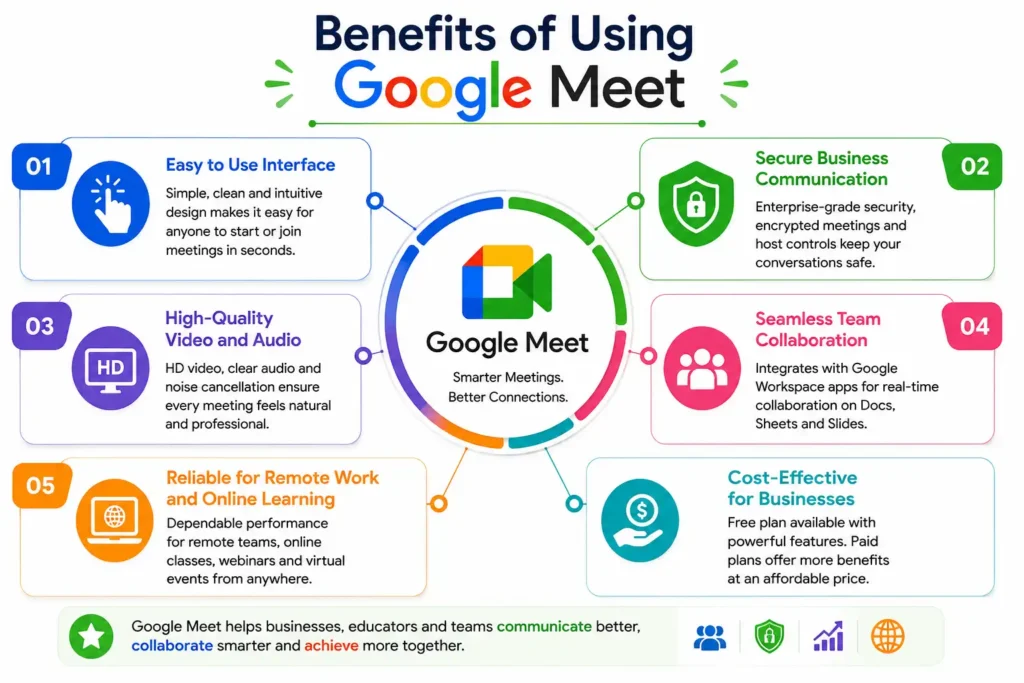
Easy-to-Use Interface
Google Meet offers a clean, intuitive interface that requires very little learning. Users can schedule, join, or host meetings within minutes using simple navigation and familiar Google services. Even first-time participants can quickly access meetings without technical expertise, making the platform suitable for businesses, educators, students, and individual users alike.
Secure Business Communication
Google protects Google Meet with encrypted data transmission, secure authentication, and advanced administrative controls available through Google Workspace. Meeting hosts can manage participant permissions, approve join requests, and control screen sharing to maintain secure sessions. These enterprise-grade protections help organizations safeguard confidential discussions and sensitive business information.
High-Quality Video and Audio
Google Meet delivers reliable HD video conferencing with adaptive audio technology that adjusts to changing network conditions. AI-powered noise cancellation reduces background distractions, while video enhancements improve meeting clarity. These technologies help participants communicate naturally, creating professional virtual meetings that remain productive even with varying internet connections.
Seamless Team Collaboration
Google Meet works seamlessly with Docs, Sheets, Slides, Drive, and Calendar, allowing teams to collaborate during meetings without changing applications. Employees can edit documents together, review presentations, and share files instantly. This connected workflow reduces delays, improves communication, and helps teams complete projects faster through real-time collaboration.
Reliable for Remote Work and Online Learning
Remote teams and educational institutions rely on Google Meet for dependable virtual communication. Features like screen sharing, breakout rooms, live captions, and meeting recordings support productive collaboration and interactive learning experiences. Whether conducting business meetings or online classes, users benefit from a stable platform that supports flexible work and education.
Cost-Effective for Businesses
Google Meet offers a free version for basic video conferencing, while Google Workspace plans provide advanced collaboration, security, AI, and administrative features at competitive pricing.
📌 Don’t Miss These Articles: Best AI Study Tools: 10 Smart Apps for Students
Google Meet vs Zoom vs Microsoft Teams Comparison
Choosing the right video conferencing platform depends on your organization’s collaboration needs, budget, and existing software ecosystem. Google Meet excels for Google Workspace users, Zoom is known for large virtual events and webinars, while Microsoft Teams integrates deeply with Microsoft 365. The comparison below highlights the major differences to help businesses, educators, and remote teams select the platform that best matches their communication and productivity requirements.
| Feature | Google Meet | Zoom | Microsoft Teams |
| Best For | Google Workspace users | Webinars & meetings | Microsoft 365 organizations |
| Free Plan | Yes | Yes | Yes |
| HD Video | Yes | Yes | Yes |
| AI Features | Gemini AI summaries, notes | AI Companion | Microsoft Copilot |
| Meeting Recording | Workspace plans | Paid plans | Microsoft 365 plans |
| Live Captions | Yes | Yes | Yes |
| Screen Sharing | Yes | Yes | Yes |
| Breakout Rooms | Yes | Yes | Yes |
| Google Workspace Integration | Excellent | Limited | Limited |
| Microsoft 365 Integration | Basic | Basic | Excellent |
| Security | Enterprise-grade | Enterprise-grade | Enterprise-grade |
| Ideal Users | Businesses, schools, remote teams | Large events, webinars | Enterprise collaboration |
Google Meet Best Practices and Productivity Tips
Getting the most from Google Meet involves more than simply joining a video call. Proper preparation, good meeting etiquette, AI-powered tools, and strong security practices can significantly improve communication and productivity. Whether you’re hosting internal team meetings, client presentations, webinars, or online classes, following proven best practices helps reduce technical issues, improve engagement, and ensure every meeting delivers meaningful outcomes. Small improvements before and during meetings often lead to better collaboration and more efficient decision-making.
Prepare Before the Meeting
Create an agenda, test your microphone and camera, organize presentation materials, and share relevant documents before participants join. Preparing in advance keeps meetings focused, minimizes delays, and helps attendees understand objectives. Well-planned meetings typically finish on time while producing clearer discussions and actionable outcomes.
Improve Video and Audio Quality
Use a stable internet connection, good lighting, a quality microphone, and headphones whenever possible. Close unnecessary applications that consume bandwidth and position your camera at eye level. These simple adjustments improve communication, reduce distractions, and create a more professional meeting experience for everyone involved.
Use AI Features to Save Time
Take advantage of Gemini AI to generate meeting summaries, capture action items, and organize important discussion points automatically. AI-generated notes reduce manual documentation, improve follow-up accuracy, and help participants stay focused during conversations instead of multitasking with note-taking responsibilities.
Manage Large Meetings Effectively
For larger meetings, assign co-hosts, mute participants when necessary, use polls and Q&A sessions, and organize breakout rooms for group discussions. Establish clear speaking guidelines and share agendas beforehand. These strategies improve engagement, reduce confusion, and help meetings remain productive even with hundreds of attendees.
Keep Meetings Secure
Share meeting links only with intended participants, enable host controls, review join requests carefully, and restrict screen sharing when appropriate. Removing unauthorized attendees and using Google’s built-in security settings helps protect confidential discussions while maintaining a safe and professional virtual meeting environment.
Professional Video Meeting Etiquette
Join meetings on time, keep your microphone muted when not speaking, maintain eye contact with the camera, and minimize background distractions. Dress appropriately for professional meetings and actively participate when required. Good virtual meeting etiquette creates stronger communication, demonstrates professionalism, and leaves a positive impression on colleagues and clients.
Google Meet Pricing and Plans
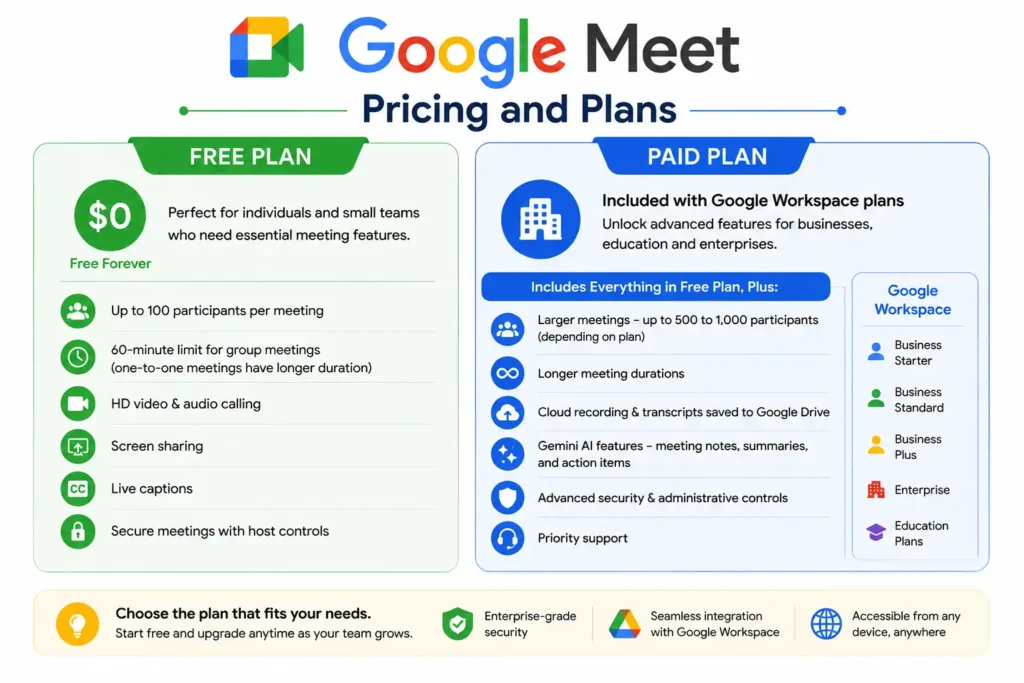
Paid Plan
Google Meet’s premium features are available through Google Workspace subscriptions, including Business Starter, Business Standard, Business Plus, Enterprise, and selected education plans. Paid users receive benefits such as extended meeting durations, larger participant limits, cloud recording, Gemini AI-powered meeting notes, enhanced security controls, administrative management, and additional collaboration tools. Pricing varies depending on the Workspace edition and organization size, allowing businesses to scale as their communication needs grow.
Free Plan
The free version of Google Meet provides everything many individuals and small teams need to host professional video meetings. Users can create secure meetings, share screens, enable live captions, and join from multiple devices using only a Google account. Free meetings support up to 100 participants with a 60-minute limit for group meetings, making the plan suitable for personal collaboration, interviews, tutoring, and small business communication.
Frequently Asked Questions
Is Google Meet Free?
Yes. Users can host secure video meetings, share their screen, use live captions, and invite up to 100 participants. Businesses that require AI features, cloud recording, larger meetings, and advanced administration can upgrade to a Google Workspace subscription for additional capabilities.
How Many Participants Can Join Google Meet?
Participant limits depend on your Google Workspace plan. The free version supports up to 100 participants, while Business and Enterprise plans support significantly larger meetings. Some enterprise editions can accommodate up to 1,000 interactive participants for eligible organizations, making Google Meet suitable for everything from small team meetings to large corporate events.
What Is the Time Limit for Google Meet?
Google Meet’s free plan allows group meetings of up to 60 minutes. One-on-one meetings generally have much longer availability. Paid Google Workspace plans extend meeting durations substantially, making them better suited for conferences, workshops, online training, and lengthy business discussions without frequent interruptions.
Is Google Meet Safe for Business Meetings?
Yes. Google Meet uses encrypted data transmission, secure authentication, and enterprise-grade security controls to protect meetings. Administrators can manage participant permissions, approve join requests, control screen sharing, and remove unauthorized users. These security measures make Google Meet a trusted communication platform for businesses, educational institutions, and government organizations.
Can You Record Google Meet Sessions?
Yes, but meeting recording is available on eligible Google Workspace plans rather than the standard free version. When enabled, recordings are automatically saved to Google Drive for easy access and sharing. Organizations commonly use recordings for employee training, compliance documentation, project reviews, and sharing information with team members who missed the meeting.
Does Google Meet Work Without a Google Account?
In many cases, yes. Meeting organizers generally need a Google account to create meetings, but guests can often join through a shared meeting link without signing into Google, depending on the organizer’s Workspace settings. Organizations may also require authentication for additional security and administrative control.
Can Google Meet Translate or Transcribe Meetings?
Yes. Google Meet supports live captions using Google’s speech recognition technology, while eligible Google Workspace plans include AI-powered translated captions and meeting transcripts. Combined with Gemini AI meeting summaries, these features improve accessibility, simplify documentation, and help multilingual teams collaborate more effectively across different languages.
Which Devices Support Google Meet?
Google Meet works on Windows, macOS, ChromeOS, Android, iPhone, iPad, and most modern web browsers, including Google Chrome, Microsoft Edge, Firefox, and Safari. Users can also join from supported conference room hardware. This broad compatibility allows participants to attend meetings from desktops, laptops, tablets, and smartphones with a consistent experience.
📌 Don’t Miss These Articles: 7 Best Web Hosting Service Provider for Beginners (2026 Guide)
Conclusion
Google Meet has evolved into one of the world’s leading video conferencing platforms by combining reliable performance, enterprise-level security, AI-powered productivity, and seamless Google Workspace integration. Whether you’re hosting business meetings, teaching online classes, collaborating with remote teams, or connecting with clients, Google Meet provides the tools needed for productive virtual communication. With flexible pricing, cross-device compatibility, intelligent Gemini AI features, and continuous innovation from Google, it remains an excellent choice for individuals and organizations looking for a secure, modern, and scalable online meeting solution.
✨ Make every scroll count. Follow Tech Fueler.