
Introduction
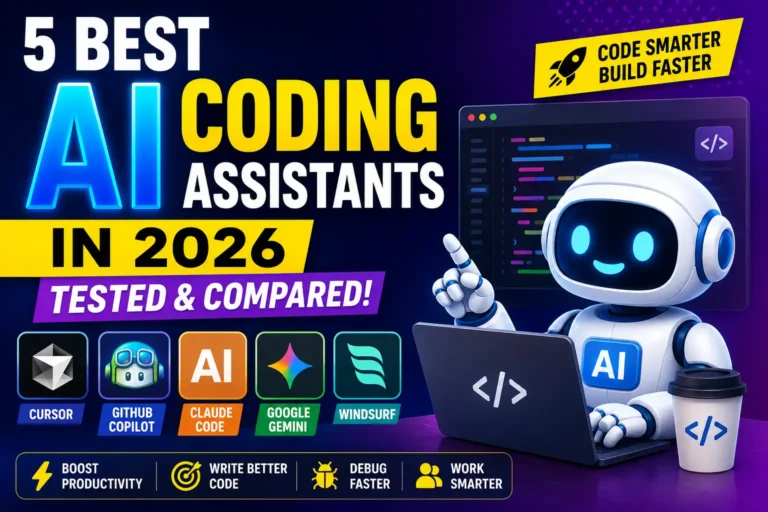
Artificial intelligence has changed software development faster than almost any other technology in recent years. Instead of writing every line manually, developers now rely on AI coding assistants to generate code, fix bugs, explain complex logic, and automate repetitive tasks. According to multiple industry surveys, most professional developers now use AI tools as part of their daily workflow because they significantly reduce development time and improve productivity. In this guide, we tested and compared the five best AI coding assistants in 2026 based on coding accuracy, features, ease of use, supported languages, pricing, and real-world performance to help you choose the right solution.
What Is an AI Coding Assistant and How Do These Tools Work?
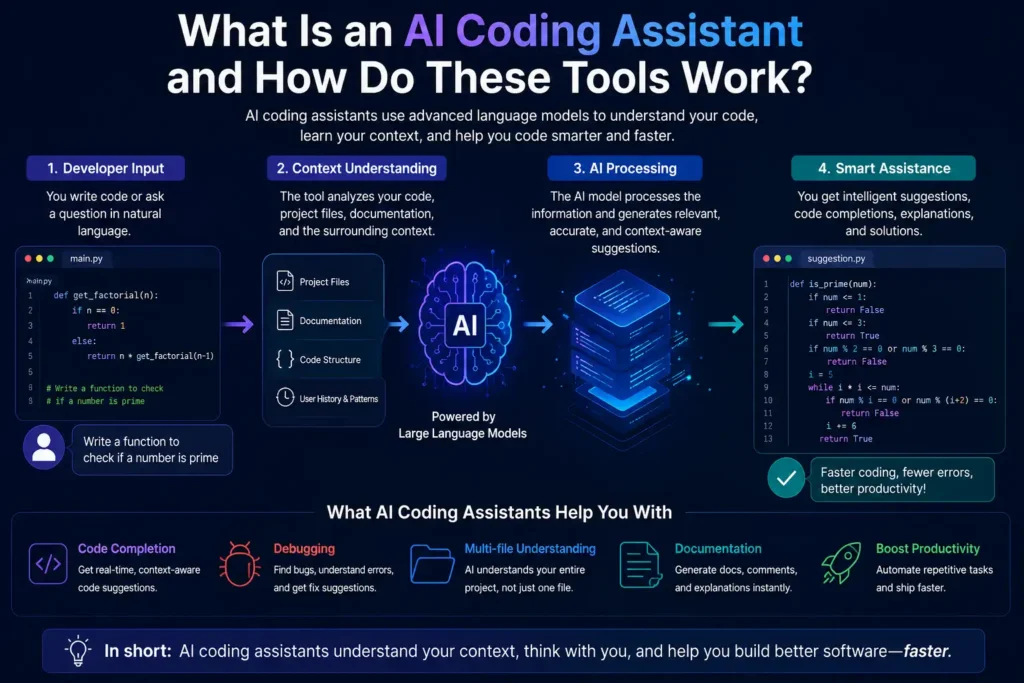
An AI coding assistant is an intelligent software tool powered by large language models (LLMs) that helps developers write, edit, debug, and optimize code. Unlike traditional autocomplete, modern assistants understand project context, multiple files, APIs, and coding patterns before generating suggestions. Many also function as AI agents that can complete entire development tasks with minimal supervision. They continuously analyze your prompts, existing codebase, documentation, and project structure to provide relevant recommendations. This enables developers to build applications faster while reducing repetitive work, improving code quality, and minimizing common programming errors.
Cursor AI
Cursor AI has become one of the most popular AI-first code editors in 2026 because it was built specifically around AI-assisted development instead of adding AI as an extra feature. Based on Visual Studio Code, Cursor combines intelligent autocomplete, codebase awareness, multi-file editing, and powerful AI agents into a seamless workflow. It supports leading AI models from Anthropic, OpenAI, and Google, allowing developers to choose the best model for different tasks. Its ability to understand large repositories and automate complex coding workflows makes it a top choice for professional developers.
Key Features
Cursor offers context-aware code completion, AI-powered chat, multi-file editing, repository-wide search, autonomous coding agents, terminal assistance, smart refactoring, bug fixing, documentation generation, and support for popular programming languages. It also preserves compatibility with most VS Code extensions, making migration simple for existing developers.
Pros & Cons
Pros: Excellent codebase understanding, powerful AI agents, fast code generation, clean interface, supports multiple frontier AI models, and ideal for large software projects.
Cons: Premium features require a paid subscription, heavy AI usage can increase costs, and beginners may need time to understand its advanced workflow.
🎯 More Helpful Guides: 10 AI Use Cases Every HR Team Should Know in 2026
GitHub Copilot
GitHub Copilot remains one of the most trusted AI coding assistants because it integrates directly into popular development environments, including Visual Studio Code, JetBrains IDEs, Neovim, and Xcode. Developed by GitHub and Microsoft, Copilot excels at code completion, documentation generation, test creation, and pull request assistance. In 2026, GitHub expanded Copilot with agent capabilities and support for multiple AI models, making it more capable than earlier versions. Its deep integration with GitHub repositories and enterprise security features makes it especially attractive for professional software teams.
Key Features
GitHub Copilot provides real-time code suggestions, AI chat, pull request summaries, test generation, code explanations, debugging assistance, agent workflows, support for multiple programming languages, GitHub integration, and compatibility across major IDEs. Enterprise plans also include advanced governance and security controls.
Pros & Cons
Pros: Broad IDE compatibility, excellent GitHub integration, reliable autocomplete, enterprise-ready security, and strong documentation support.
Cons: Advanced AI features may require higher-tier plans, usage-based pricing can increase costs for heavy users, and complex refactoring sometimes requires additional prompting.
🎯 More Helpful Guides: Why Tech Giants Are Investing Billions in AI Infrastructure
Claude Code
Claude Code has emerged as one of the strongest AI coding agents in 2026, particularly for developers working on large, complex codebases. Instead of focusing only on autocomplete, Claude Code emphasizes reasoning, planning, debugging, and autonomous task execution. It performs exceptionally well on large refactoring projects, architecture changes, and documentation-heavy workflows because of its extensive context window and advanced reasoning capabilities. Many experienced developers now pair Claude Code with an IDE like Cursor for maximum productivity, combining intelligent editing with powerful autonomous problem-solving.
Key Features
Claude Code includes advanced reasoning, large context handling, terminal-based workflows, repository analysis, autonomous coding agents, bug investigation, documentation generation, multi-step planning, code review assistance, and intelligent project-wide refactoring for complex software development tasks.
Pros & Cons
Pros: Outstanding reasoning abilities, excellent for large repositories, strong debugging performance, detailed code explanations, and highly effective for complex engineering tasks.
Cons: Terminal-first workflow may not suit every developer, higher usage can become expensive, and some features require familiarity with agent-based development.
🎯 More Helpful Guides: Classroom 30X: The Future of AI-Powered Education in 2026
Google Gemini Code Assist
Google Gemini Code Assist has evolved into a capable AI coding assistant that combines Google’s Gemini models with developer-focused productivity features. It integrates directly with Visual Studio Code, JetBrains IDEs, and Google Cloud services while offering intelligent code completion, debugging, code explanations, and AI-powered chat. One of its biggest strengths is generous access for individual developers, making it an attractive option for students, freelancers, and teams already using the Google ecosystem. Its large context window also helps developers understand and navigate extensive codebases more efficiently while maintaining high coding accuracy across multiple programming languages.
Key Features
Gemini Code Assist delivers AI code completion, conversational coding assistance, bug detection, documentation generation, support for multiple programming languages, IDE integration, large-context code understanding, Google Cloud integration, and intelligent code explanations that help developers solve problems faster while maintaining coding quality.
Pros & Cons
Pros: Free tier for individual developers, excellent integration with Google Cloud, supports multiple IDEs, strong code explanations, large context window, and reliable performance across popular programming languages.
Cons: Works best within the Google ecosystem, advanced enterprise capabilities require paid plans, and code suggestions may occasionally need refinement for highly specialized development tasks.
🎯 More Helpful Guides: Google One: Plans, Features, AI Tools & Benefits Guide
5. Windsurf
Windsurf has quickly become one of the fastest-growing AI coding assistants in 2026 thanks to its agentic development approach. Built by Codeium, it combines an AI-powered editor with intelligent coding agents that can understand project context, edit multiple files, generate documentation, and automate development workflows. Its Cascade AI agent allows developers to move beyond simple autocomplete by completing larger programming tasks with minimal manual input. Windsurf also supports popular AI models and integrates smoothly with existing development environments, making it an excellent choice for both individual developers and engineering teams.
Key Features
Windsurf includes Cascade AI agents, intelligent code completion, multi-file editing, repository-wide context awareness, AI chat, automated debugging, code refactoring, documentation generation, terminal assistance, support for multiple programming languages, and compatibility with popular developer workflows for faster software development.
Pros & Cons
Pros: Fast AI-powered editor, excellent multi-file understanding, powerful autonomous coding agents, intuitive interface, generous free plan, and strong productivity features for modern software development.
Cons: Some advanced capabilities require a paid subscription, AI responses may occasionally require manual review, and enterprise collaboration features are still evolving compared to older platforms.
Main Features to Need in an AI Coding Assistant
AI-Powered Debugging
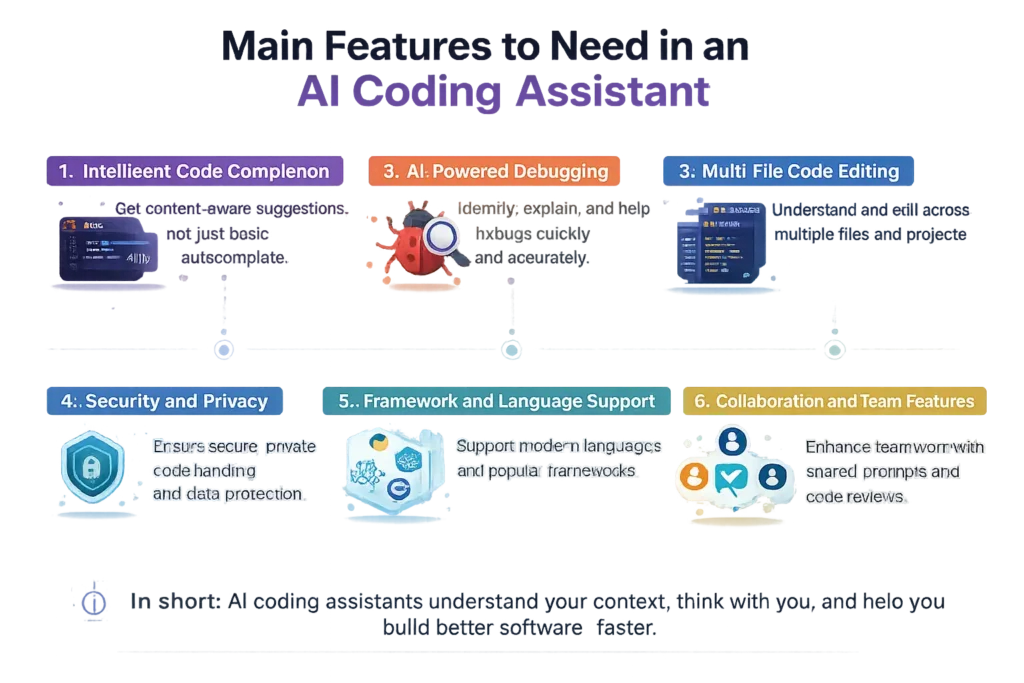
An effective AI assistant should quickly identify bugs, explain their causes, recommend fixes, and suggest performance improvements. AI-powered debugging reduces troubleshooting time and helps developers resolve syntax errors, logic issues, and runtime problems more confidently.
Multi-File Code Editing
Large software projects involve multiple interconnected files. The best AI coding assistants understand relationships across the entire repository, allowing them to update several files simultaneously while maintaining consistency and reducing manual editing effort during refactoring.
Security and Privacy
Security is essential when using AI for software development. Choose tools that offer enterprise-grade encryption, private repositories, secure data handling, compliance certifications, and clear policies explaining whether your code is used for AI model training.
Framework and Language Support
A quality AI coding assistant should support popular programming languages such as Python, JavaScript, Java, C++, Go, Rust, and TypeScript while also understanding modern frameworks like React, Angular, Vue, Next.js, Django, and Spring Boot.
Collaboration and Team Features
Development is rarely a solo activity. AI coding assistants should support shared workspaces, pull request summaries, code reviews, documentation generation, version control integration, and enterprise collaboration features that improve communication across engineering teams.
How to Choose the Right AI Coding Assistant
The ideal AI coding assistant depends on your experience level, development workflow, and project requirements. Beginners often benefit from tools with simple interfaces and helpful explanations, while experienced developers may prioritize advanced AI agents, repository awareness, and automation capabilities. Consider factors such as IDE compatibility, supported programming languages, pricing, privacy policies, AI model quality, and enterprise security. Testing free versions before purchasing allows you to compare real-world performance and determine which assistant improves your productivity without disrupting your existing development process.
Benefits and Limitations of AI Coding Assistants
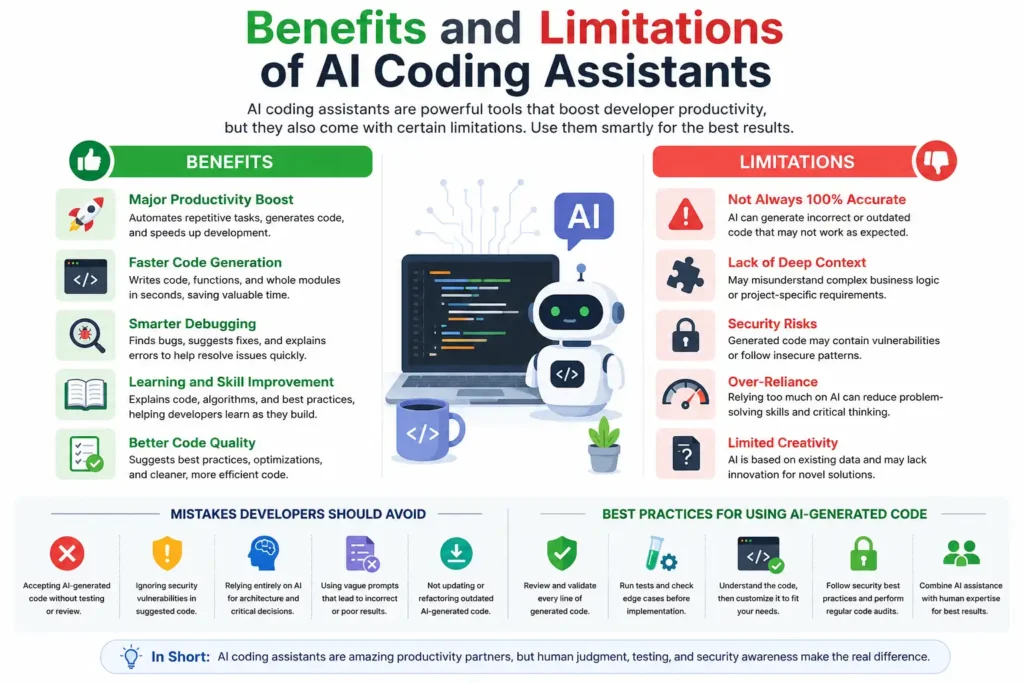
AI coding assistants have become valuable development partners by automating repetitive programming tasks and accelerating software delivery. However, they are not perfect replacements for human developers. Understanding both their strengths and limitations helps teams use them effectively while avoiding common mistakes. Successful developers treat AI as a productivity tool rather than a substitute for technical knowledge. Combining AI-generated suggestions with human expertise produces more secure, maintainable, and reliable software while reducing development time and improving overall coding efficiency.
Major Productivity Benefits
AI coding assistants accelerate development by generating code, automating documentation, fixing bugs, writing tests, explaining unfamiliar code, and reducing repetitive tasks. Many developers report significant productivity improvements when AI becomes part of their daily software development workflow.
Common Limitations
AI can occasionally generate incorrect, outdated, or insecure code. It may misunderstand project requirements, overlook business logic, or produce inefficient solutions. Human review remains essential before deploying AI-generated code into production environments.
Mistakes Developers Should Avoid
Developers should avoid accepting AI-generated code without testing, ignoring security vulnerabilities, relying entirely on AI for architecture decisions, or using outdated prompts. Careful code reviews ensure generated solutions meet performance, quality, and security standards.
Best Practices for Using AI-Generated Code
Always review generated code, run automated tests, validate security, verify business logic, and customize outputs to match project requirements. Using clear prompts and combining AI assistance with developer expertise consistently produces higher-quality software applications.
Quick Comparison of the 5 Best AI Coding Assistants in 2026
| AI Coding Assistant | Best For | Standout Feature | Free Version | Ideal Users |
| Cursor AI | Full-stack development | AI-first editor with autonomous agents | Limited | Professional developers |
| GitHub Copilot | Daily coding workflows | Deep GitHub and IDE integration | Limited | Individual developers and teams |
| Claude Code | Large codebases | Advanced reasoning and repository analysis | Usage-based | Senior developers and engineers |
| Google Gemini Code Assist | Google ecosystem | Large context window and Cloud integration | Yes | Students, freelancers, and cloud developers |
| Windsurf | AI agent workflows | Cascade AI and multi-file automation | Yes | Developers seeking AI-first coding experience |
Frequently Asked Questions
Which AI coding assistant is best in 2026?
There is no single AI coding assistant that is best for every developer. Cursor AI is an excellent choice for advanced coding workflows because of its AI-first editor and autonomous agents. GitHub Copilot remains a strong option for everyday development with deep IDE integration. Claude Code stands out for complex reasoning, while Google Gemini Code Assist offers excellent value with its generous free tier. Windsurf is ideal for developers who want AI-powered automation and multi-file editing.
Is GitHub Copilot better than Cursor?
It depends on your workflow. GitHub Copilot excels at fast code completion, GitHub integration, and broad IDE support, making it ideal for many professional teams. Cursor, however, offers deeper codebase awareness, autonomous AI agents, and advanced multi-file editing capabilities. Developers working on large or complex projects often prefer Cursor, while those already invested in GitHub may find Copilot a better fit.
Which AI coding assistant is free?
Several AI coding assistants offer free plans in 2026. Google Gemini Code Assist provides one of the most generous free tiers for individual developers. Windsurf also includes a capable free plan with core AI features. Cursor AI and GitHub Copilot offer limited free access or trial options, while premium features typically require a paid subscription for heavier usage.
Can AI coding assistants build complete applications?
Modern AI coding assistants can generate project structures, write features, create APIs, build user interfaces, and automate testing. However, they still require human guidance for architecture, business logic, security, and final quality assurance. They significantly speed up application development but should be viewed as intelligent collaborators rather than fully autonomous software developers.
Are AI coding assistants safe for enterprise projects?
Yes, many leading AI coding assistants are designed with enterprise security in mind. Platforms such as GitHub Copilot Enterprise, Cursor Business, and Google Gemini Code Assist Enterprise offer security controls, private repository support, encryption, and administrative policies. Organizations should still review vendor privacy policies and ensure sensitive code remains protected according to internal compliance requirements.
Which AI coding assistant works with VS Code?
Most leading AI coding assistants support Visual Studio Code. Cursor is built on the VS Code foundation, while GitHub Copilot, Google Gemini Code Assist, and Windsurf all integrate seamlessly with VS Code. This allows developers to continue using familiar extensions and workflows while adding powerful AI capabilities to their coding environment.
Do AI coding assistants replace software developers?
No. AI coding assistants improve developer productivity, but they cannot replace human expertise. Developers are still responsible for designing software architecture, solving complex business problems, reviewing AI-generated code, ensuring security, and making technical decisions. AI works best as a productivity tool that enhances human skills instead of replacing them.
Which AI coding assistant is best for beginners?
Google Gemini Code Assist and GitHub Copilot are excellent options for beginners because they provide helpful code suggestions, explanations, and easy IDE integration. Windsurf is another beginner-friendly choice thanks to its intuitive interface and AI-powered workflows. As developers gain experience, they may choose more advanced tools like Cursor or Claude Code for larger and more complex projects.
🎯 More Helpful Guides: ClickUp: Powerful Project Management Platform
Conclusion
AI coding assistants have become an essential part of modern software development in 2026. Whether you are building web applications, debugging complex systems, or learning to code, the right assistant can save time, improve code quality, and reduce repetitive work. Cursor AI leads with advanced AI agents and deep codebase understanding, GitHub Copilot remains a reliable all-round choice, Claude Code excels at complex reasoning, Google Gemini Code Assist delivers excellent value for individuals, and Windsurf offers an innovative AI-first development experience. Evaluate your coding workflow, budget, preferred IDE, and project requirements before choosing a tool. The best AI coding assistant is ultimately the one that integrates naturally into your development process and helps you build better software faster.
🛠️ Practical tech knowledge for everyday life. Follow Tech Fueler.